本页目录
微信小程序JSAPI调用原理逆向分析
演示文件
以下文件从微信小程序开发者工具中下载,可能与从微信APK解包出来的略有差异:
以下文件从微信APK解包,并经过格式化:
从微信APK解包的库文件:
微信客户端版本:微信8.0.65
wx.getLocation
JS层:对wx对象的包装
调试控制台中,输入wx.getLocation,发现输出的函数对象只是一个统一包装过的函数。

整体包装的逻辑为:
环境初始化时,wx对象会经过condomWX的包装:
var s = e.__ctx_bridge.condomPrototype(n);
_.onReady((()=>{
    if (!0 === _.useHighPerformanceMode)
        return a.Z.wx = e.wx,
        void (e.doAuditsInjectLogic && e.doAuditsInjectLogic({
            globalWx: a.Z.wx
        }));
    if (s) {
        var t;
        if (o)
            o = i(_.expt, e.wx, o),
            a.Z.wx = o;
        else
            a.Z.wx = y.condomWX(e.wx, e.skipCondom, null === (t = e.__wxConfig) || void 0 === t ? void 0 : t.expt)
    } else {
        var r;
        if (o)
            return o = i(_.expt, e.wx, o),
            a.Z.wx = o,
            void (e.doAuditsInjectLogic && e.doAuditsInjectLogic({
                globalWx: a.Z.wx
            }));
        a.Z.wx = y.condomWX(e.wx, e.skipCondom, null === (r = e.__wxConfig) || void 0 === r ? void 0 : r.expt)
    }
    e.doAuditsInjectLogic && e.doAuditsInjectLogic({
        globalWx: a.Z.wx
    }),
    e.isPlayableEnv && (a.Z.wx = e.mockPlayableEnv(a.Z))
}
)),
其中,wx对象上的属性会在第一次被访问时被懒包装,也就是调试控制台中看到的函数对象:
fe = (e,t=[],r={})=>{
    V(e),
    Object.setPrototypeOf(e, Object.prototype);
    var o = function() {
        var t, r = n[a], o = Object.getOwnPropertyDescriptor(e, a) || {};
        Object.defineProperty(e, a, {
            get() {
                var e, n = Object.prototype.hasOwnProperty.call(o, "value") ? o.value : null === (e = o.get) || void 0 === e ? void 0 : e.call(this);
                if (t)
                    return t;
                if (r) {
                    var a = n;
                    return 1 & r && (e=>{
                        R.add(e)
                    }
                    )(a),
                    2 & r && (e=>{
                        M.add(e)
                    }
                    )(a),
                    t = q(a)
                }
                if ("function" == typeof n && !t) {
                    var i = function() {
                        return this instanceof i ? Reflect.construct(n, arguments, n) : Reflect.apply(n, this, arguments)
                    };
                    return Object.defineProperty(i, "name", {
                        value: n.name
                    }),
                    t = i,
                    i
                }
                return t = n
            },
            set(e) {
                Object.prototype.hasOwnProperty.call(o, "value") && (o.value = e)
            },
            enumerable: !0,
            configurable: !0
        })
    };
    for (var a of Object.keys(e))
        o()
}
这里的懒包装指的是:不在对象创建时立刻把所有属性都包好,而是在属性第一次被访问时,才动态生成包装,并缓存起来。
JS层:getLocation函数的装饰器
getLocation的定义位置是:
mQe = O()(Yze.prototype, "getLocation", [XOe, eLe, tLe, rLe], {
    configurable: !0,
    enumerable: !0,
    writable: !0,
    initializer: function() {
        return GV
    }
}),
其中[XOe, eLe, tLe, rLe]是四个装饰器,真正的函数体是GV。四个装饰器为:
XOe = Bwe(),
eLe = zwe("declare"),
tLe = zce(.05),
rLe = Cwe(),
四个装饰器分别对应以下逻辑,在GV被调用前执行:
XOe = Bwe() - 隐私权限前置检查:
function Bwe() {
    return jt("privacy", {
        hookHandlers: {
            paramHandler(...e) {
                this.params = e
            },
            asyncPrepositive() {
                return (0,
                Eb.B)() || zf([this.api], !0) ? Promise.resolve([!1]) : (0,
                _f._)(this.api).then((({success: e, errMsg: t, errno: r})=>e ? [!1] : [!0, t, r])).catch((e=>[!1]))
            }
        },
        getState: ()=>({
            modifyArgs: !0
        })
    })
}
eLe = zwe("declare") - 检查requiredPrivateInfos(参考地理位置接口新增与相关流程调整)
function zwe(e) {
    return jt("privateApi", {
        hookHandlers: {
            beforeExecute() {
                if ("declare" === e) {
                    var t, r, a, n, i = +(null === (t = $.default.appContactInfo) || void 0 === t || null === (r = t.operationInfo) || void 0 === r || null === (a = r.jsonInfo) || void 0 === a || null === (n = a.privacy) || void 0 === n ? void 0 : n.locationPrivateInfosCheckStatus), o = $.default.requiredPrivateInfos, s = o && o.indexOf(this.api) >= 0, l = !("release" !== $.default.envVersion || 1 !== i || o && s), c = "release" !== $.default.envVersion && o && !s;
                    return !l && !c || [Ct, "the api need to be declared in the requiredPrivateInfos field in app.json/ext.json", ()=>console.error(`wx.${this.api} need to be declared in the requiredPrivateInfos field in app.json/ext.json`)]
                }
                if ("permission" === e) {
                    var u = this.api
                    , d = qwe[u].permissionByte;
                    if ((0,
                    Q.J7)(d))
                        return [Ct, "no permission"]
                }
            }
        },
        getState: ()=>({
            api: void 0
        })
    })
}
tLe = zce(.05) - 数据上报:
function zce(e, t=!1, r=0, a=!1) {
    return jt("report", {
        hookHandlers: {...},
        getState: ()=>({
            api: void 0,
            prefix: void 0,
            uuid: void 0,
            params: void 0,
            invokeTime: void 0,
            report: void 0,
            shouldBelieveAsync: void 0,
            hasCheckReq: void 0,
            subContext: r,
            deep: 2
        })
    })
}
rLe = Cwe() - Promise化:
function Cwe() {
    return jt("promised", {
        hookHandlers: {
            paramHandler(...e) {
                var t = e[0] || {}
                , {success: r, fail: a, complete: n} = t;
                if (!(r || a || n)) {
                    this.promise = new Promise(((e,t)=>{
                        this.resolve = e,
                        this.reject = t
                    }
                    ));
                    var i = this.promise.then.bind(this.promise)
                    , o = this.promise.catch.bind(this.promise)
                    , s = !1
                    , l = !1;
                    o((e=>{
                        s && !l && k.thirdErrorReport({
                            error: e
                        })
                    }
                    )),
                    this.promise.then = (...e)=>("function" == typeof e[0] && (s = !0),
                    "function" == typeof e[1] && (l = !0),
                    i(...e)),
                    this.promise.catch = e=>(l = !0,
                    o(e)),
                    kwe.promise = this.promise
                }
            },
            resultHandler(e) {
                var t, r;
                if (null !== (t = this.otherDecoratorStates.checkTapPermission) && void 0 !== t && t.refuseExec)
                    return Pt;
                if (null !== (r = this.otherDecoratorStates.apiCache) && void 0 !== r && r.cacheInfo.cache) {
                    if (this.promise)
                        return (0,
                        Y.tI)(this.otherDecoratorStates.apiCache.cacheInfo.ret) ? this.otherDecoratorStates.apiCache.cacheInfo.ret : (this.resolve(this.otherDecoratorStates.apiCache.cacheInfo.ret),
                        this.promise)
                } else if (this.promise) {
                    var a;
                    return null !== (a = this.otherDecoratorStates) && void 0 !== a && a.apiCache && (this.otherDecoratorStates.apiCache.cacheInfo.rawResult = e),
                    this.promise
                }
                return Pt
            },
            success(e) {
                var t, r, a = null === (t = this.otherDecoratorStates) || void 0 === t || null === (r = t.apiCache) || void 0 === r ? void 0 : r.cacheInfo.ret;
                this.resolve && this.resolve(a || e)
            },
            fail(e) {
                this.reject && this.reject(e)
            }
        },
        getState: ()=>({
            promise: void 0,
            resolve: void 0,
            reject: void 0
        }),
        otherDecoratorStates: ["checkTapPermission", "apiCache"]
    })
}
JS层:getLocation函数体
接下来就进入真正的函数体GV:
GV = function(e={}) {
    "gcj02" !== e.type && (e.type = "wgs84");
    var t = _b(e.type);
    if (t)
        setTimeout((()=>(0,
        q.F0)(bb(t, e), $V, e, {})), 100);
    else {
        var r = Date.now()
        , a = VV[e.type]
        , n = WV[e.type];
        if (UV && r - qV < jV)
            zV.push(e);
        else {
            if (r - n >= jV || !a) {
                var i = (0,
                xS.hI)(this);
                return UV = !0,
                qV = Date.now(),
                void FV(e, {
                    afterSuccess(t) {
                        WV[e.type] = r,
                        VV[e.type] = t
                    },
                    afterAll() {
                        UV = !1;
                        var e = zV;
                        zV = [],
                        e.forEach((e=>GV(e)))
                    }
                }, i)
            }
            var o = a.errMsg && 0 === a.errMsg.indexOf("getLocation:ok");
            (0,
            q.FE)({
                name: "getLocation",
                success: o,
                args: e,
                errMsg: a.errMsg,
                res: a
            })
        }
    }
}
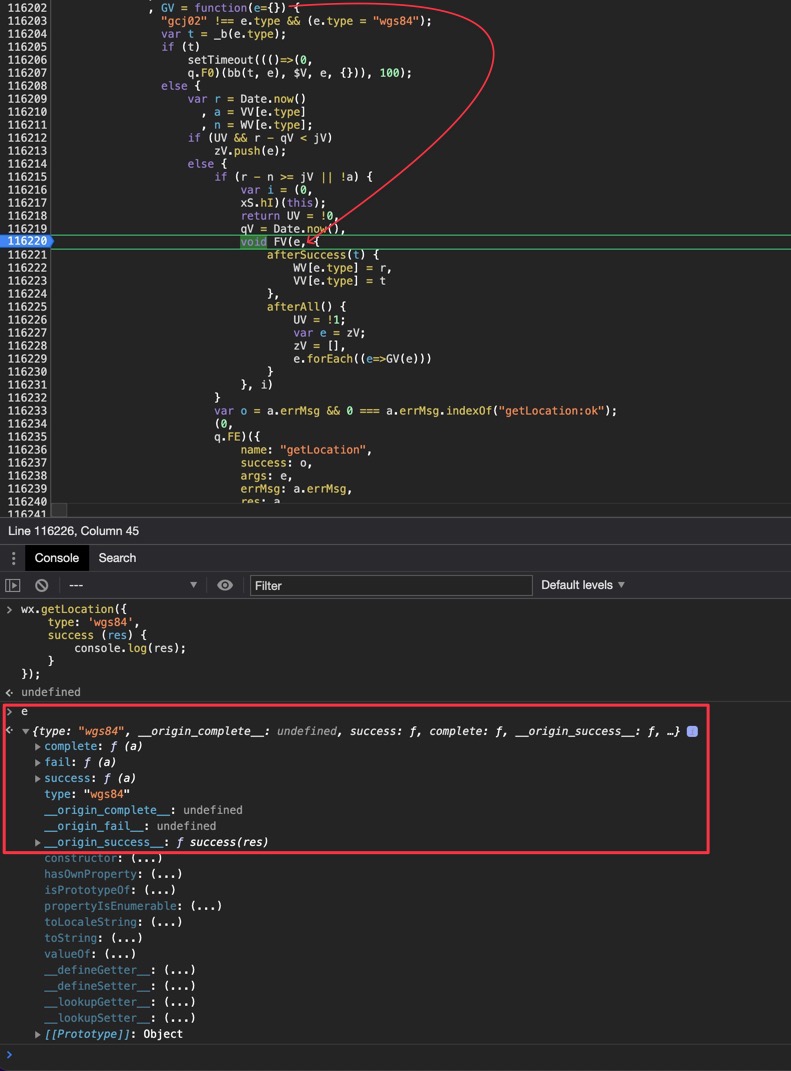
其中e是经过包装的(传入wx.getLocation的)参数,最终被传入FV函数中,FV函数定义如下:
FV = (e={},t={},r)=>{
    var a = (0,
    q.qu)(r);
    zf(["scope.userLocation"]) && (a = (0,
    q.aT)(r),
    e.permissionBytes = [1, 1, 1]),
    a($V, e, Object.assign({
        beforeSuccess(t) {
            e.altitude || delete t.altitude
        }
    }, t))
}
在FV函数中,布尔检查zf(["scope.userLocation"])的结果将决定函数a的定义(q.qu(r)或q.aT(r)),以及参数e中是否添加permissionBytes字段。结果为true时调用wx.getLocation会跳过权限检查。
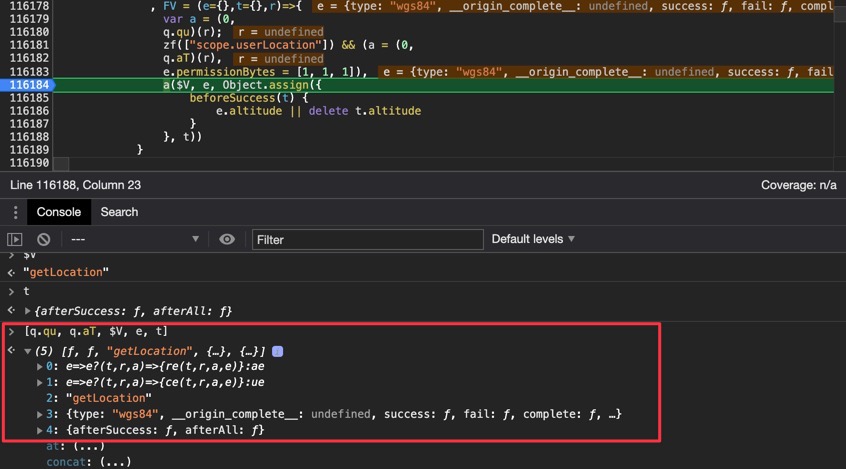
传入函数a的三个参数($V, e, t)分别是:API名称(字符串)$V、参数对象e、回调函数对象t。
对比zf(["scope.userLocation"])的结果不同时,函数a的定义分别为q.qu(r)、q.aT(r):
q.qu = e=>e?(t,r,a)=>{re(t,r,a,e)}:ae;
q.aT = e=>e?(t,r,a)=>{ce(t,r,a,e)}:ue;
ue中调用了ce函数,ae中调用了re函数,因此最终的差异要对比ce和re函数:
var te, re = ee(!1), ae = (e,t,r)=>{
    W(e) ? (0,
    b.LY)(e, t, r) : re(e, t, r)
}
, ...
, ce = ee(!0), ue = (e,t,r)=>{
    ce(e, t, r)
}
, de = e=>e ? (t,r,a)=>{
    ce(t, r, a, e)
}
: ue
可以看到就是ee(false)和ee(true)的差异。接下来分析ee函数(下面展示的代码经过了二次格式化):
function ee(e) {
    return function (t, r = {}, n = {}, i = "/") {
        var o, s, l, u, d, p = n.notPack;
        ((0, _.Kn)(r) || (r = {}),
            "operateWXData" === t &&
            (r._isFromBaseOperateWXData, delete r._isFromBaseOperateWXData),
            ("openUrl" !== t && "private_openUrl" !== t) ||
            ((o = t),
                (s = r),
                (l = Date.now()),
                (u = s.url || ""),
                (d = N(
                    D(
                        [
                            C.default.appType + 1e3,
                            o,
                            x(),
                            (0, A.Y)().scene,
                            (0, E.L)((0, A.Y)().scene_note || (0, A.Y)().sceneNote),
                            (0, P.c)(s),
                            l,
                            0,
                            (0, T.k)(),
                            (0, T.n)(),
                            (0, A.Y)().sessionid || (0, A.Y)().sessionId,
                            u,
                        ],
                        (0, P.b)(1024),
                    ),
                    ",",
                )),
                k.reportKeyValue({
                    key: "OpenUrl",
                    value: d,
                })),
            (n = (function (e, t) {
                return V(
                    F(e),
                    (r, a) => (
                        "function" == typeof e[a] &&
                        ((r[a] = (0, g.Hw)(e[a], `at api ${t} ${a} callback function`)),
                            (r[a]._argumentsLength = e[a].length)),
                        r
                    ),
                    {},
                );
            })(n, t)));
        var h = H((r = $(B(null), r)), t, n, i);
        k.reportIDKey({
            key: t,
        });
        var f,
            v = {
                keepOriginalParams: ((f = t), w.jP || (w.wZ && U.includes(f))),
            };
        if (
            (c.env.isMagicBrushFrameEnv &&
                r.contextId &&
                ((v.contextId = r.contextId), delete r.contextId),
                !e &&
                "splashad" !== c.env.workerType &&
                "directGame" !== c.env.workerType)
        ) {
            if ((0, w.LU)() && y.g4.has(t) && !(0, y.V8)(t))
                return void h({
                    errMsg: `${t}:fail API has been banned`,
                });
            if (
                (delete r.pluginId,
                    delete r.permissionBytes,
                    "string" == typeof i && Q(i, "wx"))
            ) {
                var m = Z(i);
                v.appId = m;
            }
        }
        ((0, L.B)() && (r || (r = {}), (r.permissionBytes = [1, 1, 1])),
            p && (v.notPack = !0),
            (0, a.dw)(t, r, h, v));
    };
}
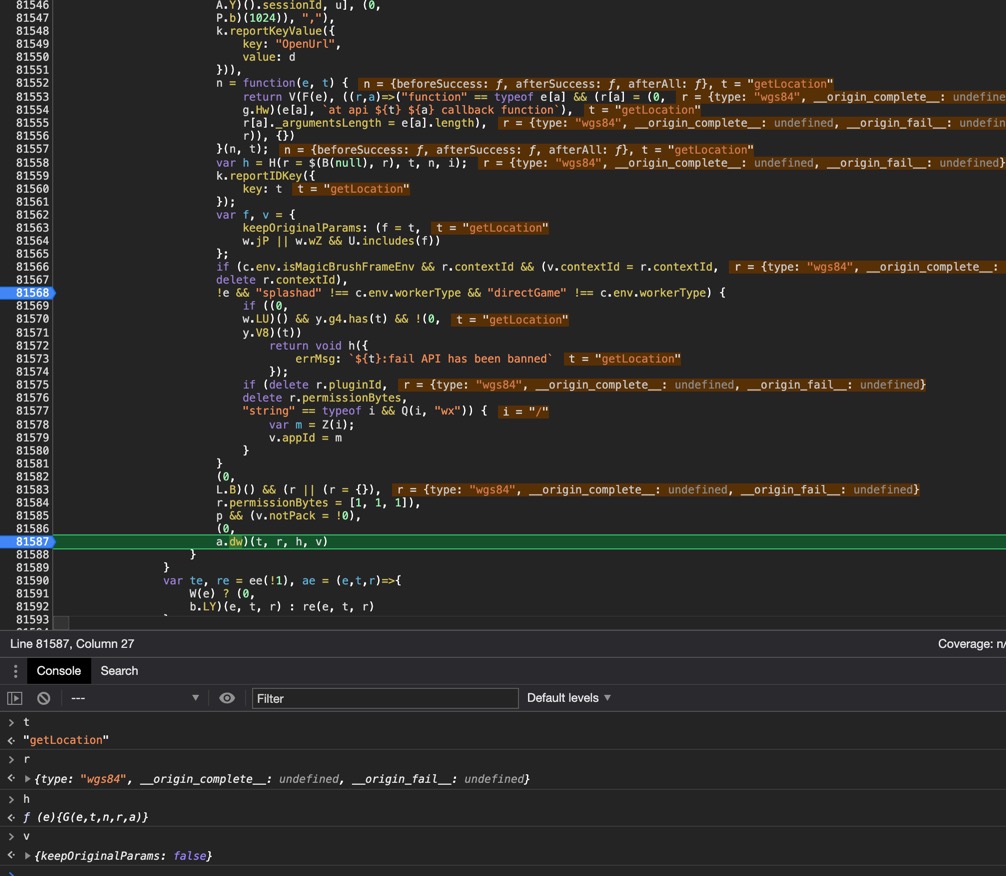
高亮部分是ee(false)时会执行的额外逻辑。最终进入的函数是(0, a.dw)(t, r, h, v)。
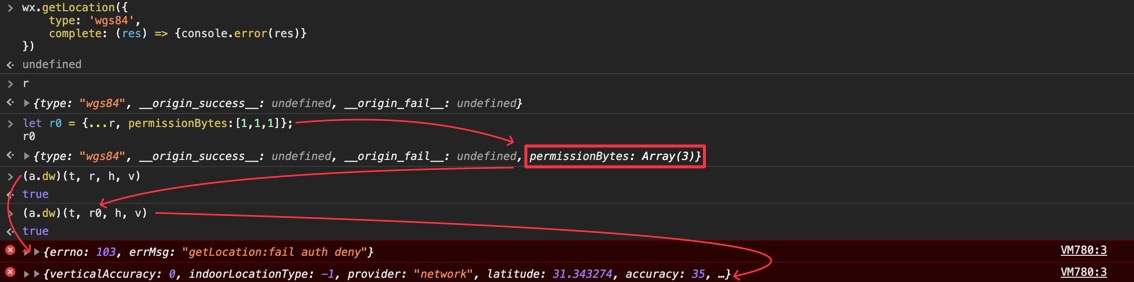
注意ee(false)时额外执行的delete r.permissionBytes。假如在a.dw调用前手动给参数r加入permissionBytes属性,即可在用户不授权位置信息的条件下,也能获得定位数据。
a.dw函数的定义可以追到:
function u(e, t, r, i={}) {
    var u = r;
    r = r=>{
        (0,
        s.yZ)(e, t) && (0 === (r.errMsg || `${e}:ok`).indexOf(`${e}:ok`) && l.emit("success", e));
        "function" == typeof u && u(r)
    }
    ,
    "navigateToMiniProgram" !== e && "openUrl" !== e && "private_openUrl" !== e || (t.adUxInfo = t.adUxInfo || (0,
    o.I)(),
    t.commonUxInfo = t.commonUxInfo || (0,
    o.l)());
    var d = i.appId;
    return "splashad" === c.env.workerType || "directGame" === c.env.workerType || a.default.supportInvokeWithAppId || void 0 === d || 4 === a.default.appType || 19 === a.default.appType ? v.invoke(e, t, r, i) : (0,
    n.Gw)((()=>{
        var a = (0,
        n.Dl)(e, d, t);
        v.invoke(e, a, r, i)
    }
    ))
}
注意到v.invoke(e, t, r, i)的逻辑,这里的v.invoke就是WeixinJSBridge.invoke。
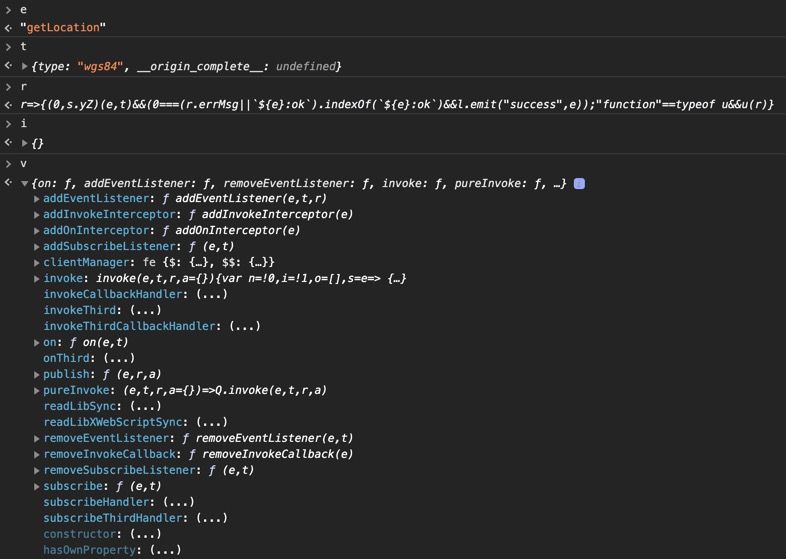
JS层:invokeHandler
找到WeixinJSBridge.invoke的定义:
invoke(e, t, r, a={}) {
    var n = !0
    , i = !1
    , o = []
    , s = e=>{
        for (var t of (i || (n = !1),
        o))
            t(e, n);
        null == r || r(e)
    }
    ;
    if (Q) {
        var l = e=>{
            o.push(e)
        }
        ;
        for (var c of ae) {
            var u = c(e, t, l);
            if (u)
                return u instanceof Promise ? (u.then((e=>{
                    s(e)
                }
                )),
                !0) : (s(u),
                !1)
        }
        Q.invoke(e, t, s, a)
    } else
        console.error(`[jsbridge] invoke ${e} fail: jsbridge not ready.`, new Error("jsbridge not ready").stack),
        s({
            errMsg: `${e}:fail jsbridge not ready`,
            errno: 4
        });
    return i = !0,
    n
},
这个invoke函数仍然是一层封装,可以看出核心逻辑还是进入Q.invoke(e, t, s, a),再追Q.invoke的定义:
invoke(e, r, a, n={}) {
    var i, s, c, u = r;
    S || n.keepOriginalParams || t.directInvokeJS || (n.notPack ? delete n.notPack : r = m.pack(r),
    ("ios" !== l.platform || z || "1" !== (null === (s = l) || void 0 === s || null === (c = s.expt) || void 0 === c ? void 0 : c.clicfg_appbrand_ios_use_jsapi_args_binding)) && (u = V(r || {})));
    if (delete n.keepOriginalParams,
    null !== (i = r) && void 0 !== i && i.noCallback && F())
        return w(e, u, 0, n),
        0;
    var d = o.add(a);
    return $() || C.set(d, e),
    n.highPerformance && (n.highPerformance[d] = r,
    delete n.highPerformance),
    "function" == typeof n.notifyId && n.notifyId(d),
    w(e, u, d, n),
    d
},
注意在这个函数中,入参(e, r, a, n)中e是API名称(字符串)"getLocation",r是参数对象,在经过u = V(r || )后(V实际是JSON.stringify)以JSON字符串的形式被传入函数w。
同样的,回调a经过var d = o.add(a);后(这里的o是一个自定义的回调管理器对象),以整数类型的IDd被传入函数w。
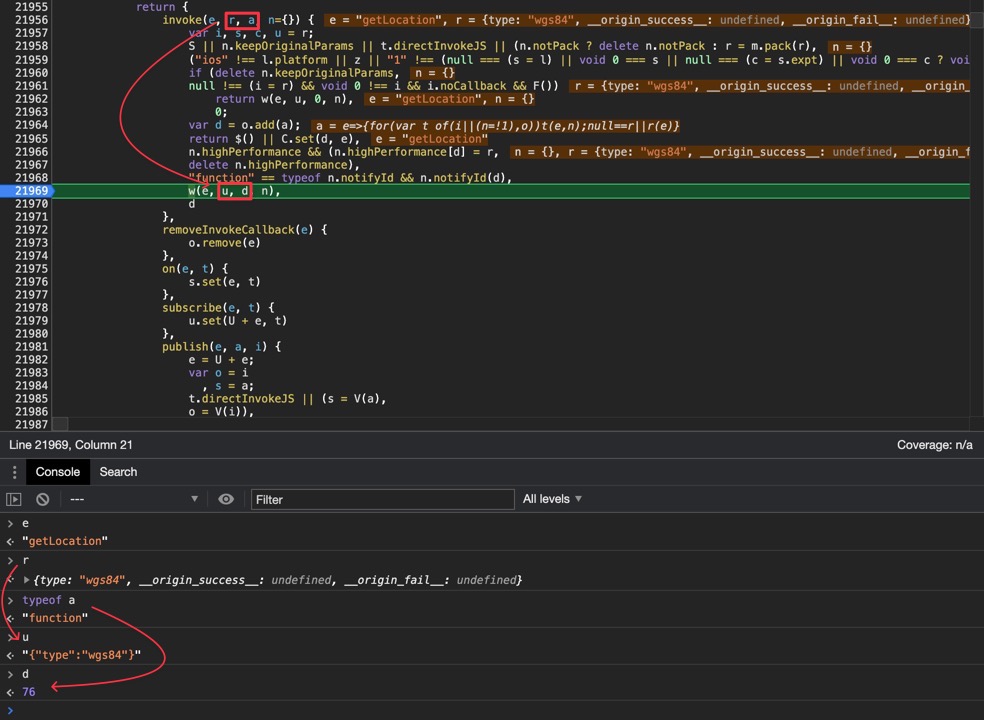
再追函数w的定义:
function w(e, a, i, o={}) {
    if (n) {
        var s, u, p;
        if ("splashad" === c.env.workerType || "directGame" === c.env.workerType || l.supportInvokeWithAppId)
            s = null === (u = n.invokeHandler) || void 0 === u ? void 0 : u.call(n, e, a, i, o);
        else
            s = null === (p = n.invokeHandler) || void 0 === p ? void 0 : p.call(n, e, a, i);
        d(s, i, void 0)
    } else {
        var h = {
            event: e,
            paramsString: a,
            callbackId: i,
            privateArgs: V(o)
        };
        if (t.isWebMiniGame) {
            d(prompt("webgame_invoke", V(h)), i, void 0)
        } else {
            var f = null == r ? void 0 : r.messageHandlers.invokeHandler.postMessage(h);
            null != f && f.catch && f.catch((t=>{
                var r = console.error.bind(console);
                r("webkit.messageHandlers.invokeHandler.postMessage fail"),
                r(`event=${e}`),
                r("params=", a),
                r("err=", t),
                r("err.code=", t.code),
                r("err.message=", t.message),
                r("err.name=", t.name)
            }
            ))
        }
    }
}
可以看到参数传入了n.invokeHandler。
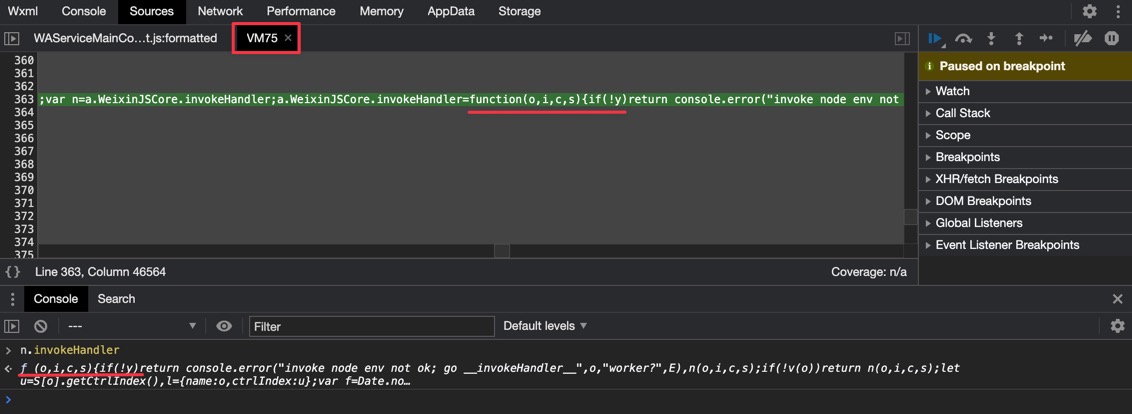
点击跳转函数位置,在开发者工具中已经没有本地文件与之对应,显示为VM75,表示这段代码可能在环境中被动态注入。不过与从微信APK解包出的基础库代码比对,能看到这段逻辑定义在node_jsapi.js文件中:
var n = a.WeixinJSCore.invokeHandler;
((a.WeixinJSCore.invokeHandler = function (o, i, c, s) {
    if (!y)
    return (
        console.error(
        "invoke node env not ok; go __invokeHandler__",
        o,
        "worker?",
        E,
        ),
        n(o, i, c, s)
    );
    if (!v(o)) return n(o, i, c, s);
    let u = S[o].getCtrlIndex(),
    l = { name: o, ctrlIndex: u };
    var f = Date.now();
    let d = new r(e, a.WeixinJSCoreAndroid, c, l, m, t);
    d.markStartTime(f);
    var h = function () {
    try {
        var e = i;
        if ("object" != typeof i && ((e = JSON.parse(i)), !p(d, e)))
        return;
        return ((e._invoke_time_ = f), S[o].invoke(d, e));
    } catch (e) {
        return (
        e.no_log ||
            console.error(
            e + "; go __invokeHandler__",
            o,
            "worker?",
            E,
            ),
        n(o, i, c, s)
        );
    }
    };
    try {
    return E && void 0 === m ? h() : t.check(d, l, h) ? h() : "";
    } catch (e) {
    return (
        e.no_log || console.error(e + "; go __invokeHandler__"),
        n(o, i, c, s)
    );
    }
}),
    delete a.javaBroker);
再追n,同样可以比对出函数逻辑定义在微信APK解包出的android.js文件中:
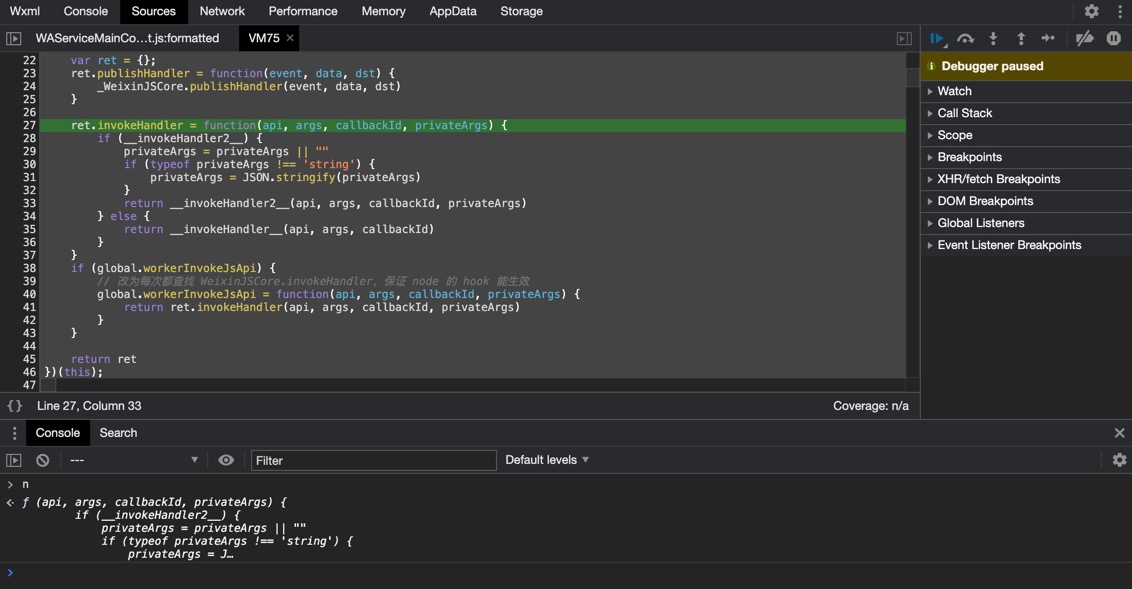
var WeixinJSCore = (function(global) {
    var _WeixinJSCore = global.WeixinJSCore
    if (!_WeixinJSCore) {
        return undefined;
    }

    var __invokeHandler__ = _WeixinJSCore.invokeHandler
    var __invokeHandler2__ = _WeixinJSCore.invokeHandler2
    if (global.NativeGlobal && global.NativeGlobal.invokeHandler) {
        __invokeHandler2__ = global.NativeGlobal.invokeHandler
    } else if (global.workerInvokeJsApi) {
        __invokeHandler2__ = global.workerInvokeJsApi
    }

    var ret = {};
    ret.publishHandler = function(event, data, dst) {
        _WeixinJSCore.publishHandler(event, data, dst)
    }

    ret.invokeHandler = function(api, args, callbackId, privateArgs) {
        if (__invokeHandler2__) {
            privateArgs = privateArgs || ""
            if (typeof privateArgs !== 'string') {
                privateArgs = JSON.stringify(privateArgs)
            }
            return __invokeHandler2__(api, args, callbackId, privateArgs)
        } else {
            return __invokeHandler__(api, args, callbackId)
        }
    }
    if (global.workerInvokeJsApi) {
        // 改为每次都查找 WeixinJSCore.invokeHandler,保证 node 的 hook 能生效
        global.workerInvokeJsApi = function(api, args, callbackId, privateArgs) {
            return ret.invokeHandler(api, args, callbackId, privateArgs)
        }
    }

    return ret
})(this);
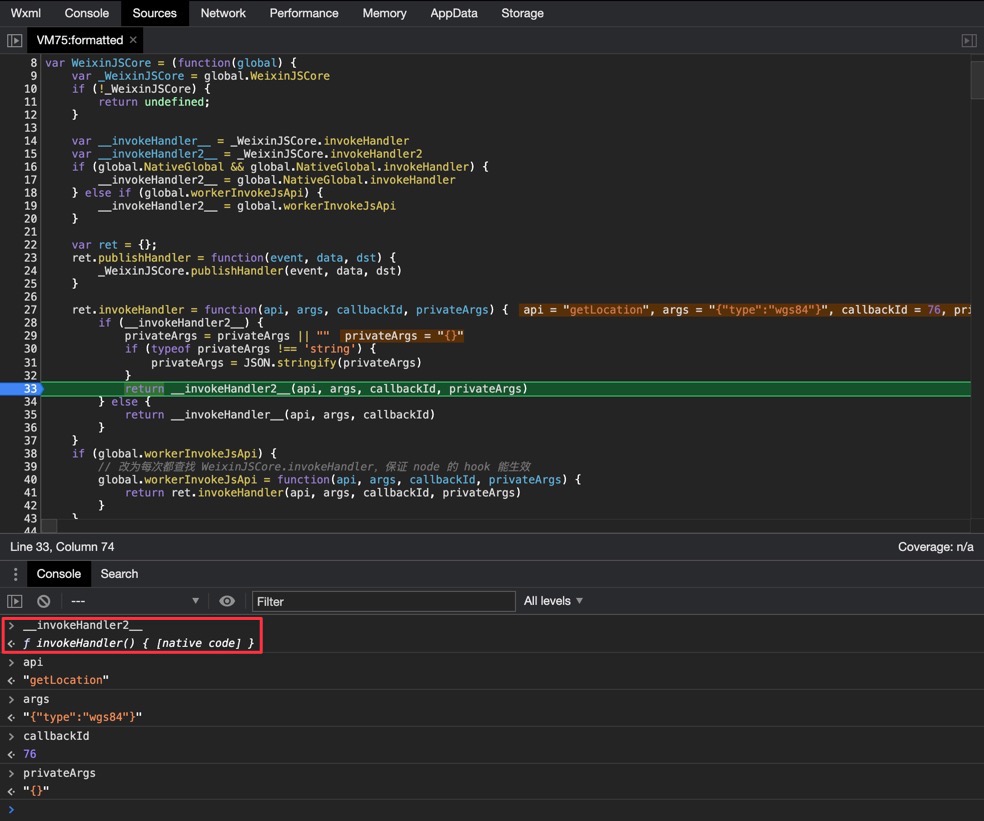
这里实际被调用的__invokeHandler2__已经是[native code],它来自global.NativeGlobal.invokeHandler,相当于调用:
NativeGlobal.invokeHandler("getLocation", '{"type":"wgs84"}', 76, {})这里就是小程序JS逻辑层的调用进入Native层的边界了。
Native层:注入NativeGlobal
微信小程序的逻辑层不跑在WebView中,而是跑在一个独立的V8 Isolate里。V8原生只能和C++交互,因此无法像渲染层那样直接用@JavascriptInterface让JS调用Java,必须由C++做中转。NativeGlobal对象实际上是Native层向V8环境中注入的,相关逻辑在libwxa-runtime-binding.so中。
逻辑层启动后,notifyCreate(appBrandCommonBindingJniParams)和notifyBindTo(isolatePtr, contextPtr, uVLoopPtr)两个函数依次被调用:
package com.tencent.mm.appbrand.commonjni;

// import ...

/* loaded from: classes8.dex */
public class AppBrandCommonBindingJni {
    private static final String TAG = "MicroMsg.AppBrandCommonBindingJni";
    private a mAppBrandDelegate;
    // ...

    static {
        d.f214192a.loadLibrary("wxa-runtime-binding");
    }

    private native void nativeBindTo(long j16, long j17, long j18, long j19);

    private native long nativeCreate(AppBrandCommonBindingJniParams appBrandCommonBindingJniParams);

    // ...

    public void notifyBindTo(long j16, long j17, long j18) {
        long j19 = this.mNativeHandle;
        if (j19 != 0) {
            nativeBindTo(j19, j16, j17, j18);
        }
    }

    public void notifyCreate(AppBrandCommonBindingJniParams appBrandCommonBindingJniParams) {
        long jNativeCreate = nativeCreate(appBrandCommonBindingJniParams);
        this.mNativeHandle = jNativeCreate;
        h.a(TAG, "hy: created with %d", Long.valueOf(jNativeCreate));
    }

    // ...
}
其中主要绑定逻辑在nativeBindTo函数中完成。其对应的Native代码为:
void __fastcall Java_com_tencent_mm_appbrand_commonjni_AppBrandCommonBindingJni_nativeBindTo(
    int a1,            // <-- JNIEnv* env,
    int a2,            // <-- jobject thiz,
    __int64 a3,        // <-- jlong nativeHandle,
    v8::Isolate * a4,  // <-- jlong isolatePtr,
    _QWORD ** a5,      // <-- jlong contextPtr,
    const void * a6    // <-- jlong uvLoopPtr,
) {
    _QWORD * v10; // x0
    _QWORD * v11; // x23
    _QWORD * Handle; // x0
    __int64 v13; // x1
    _BYTE v14[24]; // [xsp+10h] [xbp-30h] BYREF
    _BYTE v15[16]; // [xsp+28h] [xbp-18h] BYREF
    __int64 v16; // [xsp+38h] [xbp-8h]

    v16 = * (_QWORD * )(_ReadStatusReg(TPIDR_EL0) + 40);
    v8::Locker::Initialize((v8::Locker * ) v15, a4);
    v8::Isolate::Enter(a4);
    v8::HandleScope::HandleScope((v8::HandleScope * ) v14, a4);
    v10 = (_QWORD * ) operator new(0x10 u);
    v11 = v10;
    if ( * a5) {
        Handle = (_QWORD * ) v8::HandleScope::CreateHandle(a4, ** a5);
        * v11 = a4;
        v11[1] = 0;
        if (Handle)
            v11[1] = v8::api_internal::GlobalizeReference(a4, * Handle);  // <-- v11 = [isolatePtr, globalRef]
    } else {
        * v10 = a4;
        v10[1] = 0;
    }
    sub_6EBF8(a3, v11, a6);  // <-- BindTo(nativeHandle, v11, uvLoopPtr)
    sub_70FA0(
        2,
        v13,
        "/data/landun/workspace/lib-wxa-common-binding/src/main/jni/runtime/appbrand_runtime_jni.cc",
        "Java_com_tencent_mm_appbrand_commonjni_AppBrandCommonBindingJni_nativeBindTo",
        84,
        "BindTo isolate[%p] context[%p] uv[%p]",
        a4,
        a5,
        a6);
    v8::HandleScope::~HandleScope((v8::HandleScope * ) v14);
    v8::Isolate::Exit(a4);
    v8::Locker::~Locker((v8::Locker * ) v15);
}
核心逻辑进入sub_6EBF8:
void __fastcall sub_6EBF8(__int64 a1, __int64 a2, __int64 a3) {
    v8::Isolate * v5; // x19
    _QWORD * v6; // x8
    _QWORD * v7; // x9
    v8::Context * Handle; // x22
    v8::Context * CurrentContext; // x0
    __int64 v10; // x23
    __int64 v11; // x1
    __int64(__fastcall * v12)(_QWORD); // x8
    __int64 v13; // x0
    __int64 v14; // [xsp+8h] [xbp-38h] BYREF
    _BYTE v15[24]; // [xsp+10h] [xbp-30h] BYREF
    _BYTE v16[16]; // [xsp+28h] [xbp-18h] BYREF
    __int64 v17; // [xsp+38h] [xbp-8h]

    v17 = * (_QWORD * )(_ReadStatusReg(TPIDR_EL0) + 40);
    *(_QWORD * )(a1 + 160) = a2;
    *(_QWORD * )(a1 + 168) = a3;
    sub_6ED80();
    v5 = ** (v8::Isolate ** * )(a1 + 160);
    v8::Locker::Initialize((v8::Locker * ) v16, v5);
    v8::Isolate::Enter(v5);
    v8::HandleScope::HandleScope((v8::HandleScope * ) v15, v5);
    v6 = * (_QWORD ** )(a1 + 160);
    v7 = (_QWORD * ) v6[1];
    if (v7)
        Handle = (v8::Context * ) v8::HandleScope::CreateHandle( * v6, * v7);
    else
        Handle = 0;
    v8::Context::Enter(Handle);
    CurrentContext = (v8::Context * ) v8::Isolate::GetCurrentContext(v5);
    v14 = v8::Context::Global(CurrentContext);
    v10 = sub_50730(v5, a1, & v14);
    sub_4AF24(v5);
    sub_6DA24(
        2,
        v11,
        "/data/landun/workspace/lib-wxa-common-binding/src/main/jni/runtime/appbrand_runtime.cc",
        "BindTo",
        228,
        "[CommonBindg] Binding Finished. NativeGlobal prepared.");
    v12 = * (__int64(__fastcall ** )(_QWORD))(a1 + 448);
    if (v12) {
        v13 = v12( * (_QWORD * )(a1 + 456));
        sub_96494( * (_QWORD * )(a1 + 312), v13);
    }
    sub_962C8( * (_QWORD * )(a1 + 312), a2, v10);
    if ( * (_BYTE * )(a1 + 157))
        sub_4B7E0(v5, a1, & v14);
    v8::Context::Exit(Handle);
    v8::HandleScope::~HandleScope((v8::HandleScope * ) v15);
    v8::Isolate::Exit(v5);
    v8::Locker::~Locker((v8::Locker * ) v16);
}
sub_50730中就是注入的细节了。sub_4917C是一个函数注册器,用于把一个C++函数以指定名称注册到一个v8::Object(也就是NativeGlobal)上。最后调用v8::Object::Set给全局环境注入NativeGlobal对象。
__int64 __fastcall sub_50730(v8::Object * a1, int * a2, _QWORD * a3) {
    v8::Value * v6; // x0
    __int64 v7; // x1
    v8::Value * v8; // x22
    v8::Isolate * v9; // x1
    __int64 v10; // x21
    __int64 v11; // x20
    __int64 CurrentContext; // x22
    __int64 v13; // x19
    v8::api_internal * v14; // x0
    int v16[2]; // [xsp+0h] [xbp-10h] BYREF
    __int64 v17; // [xsp+8h] [xbp-8h]

    v17 = * (_QWORD * )(_ReadStatusReg(TPIDR_EL0) + 40);
    v6 = (v8::Value * ) sub_493C8(a1, * a3, "NativeGlobal");
    if (v6 && (v8 = v6, (v8::Value::IsObject(v6) & 1) != 0)) {
        sub_4FCB0(
            2,
            v7,
            "/data/landun/workspace/lib-wxa-common-binding/src/main/jni/bindings/binding_native_global.cc",
            "BindTo",
            161,
            "hy: has NativeGlobal, reuse it");
    } else {
        sub_4FCB0(
            2,
            v7,
            "/data/landun/workspace/lib-wxa-common-binding/src/main/jni/bindings/binding_native_global.cc",
            "BindTo",
            158,
            "hy: no NativeGlobal, create new one");
        v8 = (v8::Value * ) v8::Object::New(a1, v9);
    }
    *(_QWORD * ) v16 = v8;
    sub_4917C((int)a1, (int)v8, (int)"invokeHandler", (int)sub_4F804, (v8::Isolate *)a2);
    sub_4917C((int)a1, (int)v8, (int)"initModule", (int)sub_50030, (v8::Isolate *)a2);
    sub_4917C((int)a1, (int)v8, (int)"testV8Crash", (int)sub_4FDC4, (v8::Isolate *)a2);
    sub_512E8(a1, a2, v16);
    sub_4F014(a1);
    if (a2[84] <= 0) {
        sub_5561C(a1, a2, v16);
        sub_51414(a1, a2, v16);
        sub_4917C((int)a1, v16[0], (int)"getCurrentThreadTime", (int)sub_50658, (v8::Isolate *)a2);
        sub_4917C((int)a1, v16[0], (int)"createSignal", (int)sub_4FE60, (v8::Isolate *)a2);
    }
    v10 = * a3;
    v11 = * (_QWORD * ) v16;
    CurrentContext = v8::Isolate::GetCurrentContext(a1);
    v13 = v8::String::NewFromUtf8(a1, "NativeGlobal", 0, 0xFFFFFFFF LL);
    if (!v13)
        v8::api_internal::ToLocalEmpty(0);
    v14 = (v8::api_internal * ) v8::Object::Set(v10, CurrentContext, v13, v11);  // <-- 将NativeGlobal设置到全局对象上
    if (!(_BYTE) v14)
        v8::api_internal::FromJustIsNothing(v14);
    return * (_QWORD * ) v16;
}
至此就建立起了JS层通过NativeGlobal.invokeHandler调用C++函数的能力,并且可以看到invokeHandler的C++实现在sub_4F804中。
Native层:发起JNI调用
微信小程序的JSAPI最终还是需要依赖Java层的系统能力(比如定位),因此Native层在这里起到一个中转站的角色,对JS层暴露NativeGlobal对象,又通过JNI把JS层的调用转发给Java层。
[JS层]    NativeGlobal.invokeHandler(...)
          ^
  注入NativeGlobal对象
          ^
      [Native层]
          v
       JNI调用
          v
[Java层]  com.tencent.mm.appbrand.commonjni.AppBrandCommonBindingJni.nativeInvokeHandler(...)
因此接下来要分析的就是invokeHandler的C++实现(sub_4F804)最终发起了什么JNI调用。sub_4F804是对sub_4F878的简单封装:
void __fastcall sub_4F804(__int64 a1) {
    v8::Isolate * v2; // x20
    _QWORD v3[4]; // [xsp+0h] [xbp-20h] BYREF

    v3[3] = * (_QWORD * )(_ReadStatusReg(TPIDR_EL0) + 40);
    v2 = * (v8::Isolate ** )( * (_QWORD * ) a1 + 8 LL);
    v8::HandleScope::HandleScope((v8::HandleScope * ) v3, v2);
    sub_4F878(v2, a1);
    v8::HandleScope::~HandleScope((v8::HandleScope * ) v3);
}
进入sub_4F878之后的函数很长,这里只贴出最关键的逻辑:
// binding_native_global.cc invokeHandlerFunc
void __fastcall sub_4F878(v8::Isolate * a1, int * a2) {
    // ...

    FunctionTemplateData = (v8::External * ) v8::api_internal::GetFunctionTemplateData( *
        (_QWORD * )( * (_QWORD * ) a2 + 8 LL),
        *(_QWORD * ) a2 + 32 LL);
    v5 = v8::External::Value(FunctionTemplateData);

    // ...

    // sub_6364C(&result, invoker, apiNameBuf, argsBuf, privateArgsBuf, callbackId, ...);
    sub_6364C( & v48, v31, v50, & v54, & v52, (unsigned __int64) v29 >> 32, *(unsigned int * )(v5 + 336));

    // ...
}
这里的a2实际是v8::FunctionCallbackInfo指针,保存了来自JS层的调用信息。参数被取出后传入sub_6364C:
// appbrand_js_invoker.cc Invoke
void __usercall sub_6364C(
    __int64 a1 @ <X0> ,
    __int64 a2 @ <X1> ,
    unsigned __int8 * a3 @ <X2> ,
    unsigned __int8 * a4 @ <X3> ,
    unsigned int a5 @ <W4> ,
    unsigned int a6 @ <W5> ,
    _QWORD * a7 @ <X8> )
{
    // ...

    sub_62F9C(v9, a2, v22, v128, v26, & v127, & v126, a7, 0, a6, & v117);
}
sub_62F9C:
// appbrand_js_invoker.cc NativeInvokeHandlerImp
__int64 __fastcall sub_62F9C(
    __int64 * a1,
    __int64 a2,
    __int64 a3,
    unsigned int * a4,
    __int64 a5,
    unsigned int * a6,
    unsigned int * a7,
    __int64 a8,
    char a9,
    unsigned int a10,
    unsigned int * a11)
{
    // ...

    v29 = sub_633E0( * (_QWORD * )( * a1 + 216), v23, v27, v28, * a7, a9 & 1, a10, * a11);

    // ...
}
sub_633E0:
__int64 __fastcall sub_633E0(
    __int64 a1,
    __int64 a2,
    __int64 a3,
    __int64 a4,
    unsigned int a5,
    unsigned __int8 a6,
    int a7,
    int a8)
{
    __int64 v16; // x8
    __int64 v17; // x0
    __int64 v18; // x20
    _QWORD * v19; // x8
    __int64 v20; // x1
    _QWORD v22[2]; // [xsp+10h] [xbp-10h] BYREF

    v22[1] = * (_QWORD * )(_ReadStatusReg(TPIDR_EL0) + 40);
    if ( * (_BYTE * )(a1 + 48))
        v16 = * (_QWORD * )(a1 + 40);
    else
        v16 = * (_QWORD * )(a1 + 24);
    v17 = * (_QWORD * )(v16 + 8);
    v22[0] = 0;
    ( * (void(__fastcall ** )(__int64, _QWORD * , __int64))( * (_QWORD * ) v17 + 48 LL))(v17, v22, 65542);
    v18 = sub_4DA60(v22[0], *(_QWORD * )(a1 + 16), *(_QWORD * )(a1 + 80), a2, a3, a4, a5, a6, a7, a8);
    if (! * (_BYTE * )(a1 + 88)) {
        if ( * (_BYTE * )(a1 + 48))
            v19 = (_QWORD * )(a1 + 40);
        else
            v19 = (_QWORD * )(a1 + 24);
        if ((sub_8135C( * v19) & 1) != 0) {
            sub_63538(
                4,
                v20,
                "/data/landun/workspace/lib-wxa-common-binding/src/main/jni/runtime/j_appbrand_runtime.h",
                "__simple_nativeInvokeHandler",
                36,
                "[MBRELEASE_ASSERT] failed. [%s] __simple_CallObjectMethod failed. [nativeInvokeHandler]",
                "(!(usePrivate ? mPrivateJNI : mJNI.get())->dumpStackIfJavaException())");
            __android_log_assert(
                "(!(usePrivate ? mPrivateJNI : mJNI.get())->dumpStackIfJavaException())",
                "AppBrandCommon",
                "__simple_CallObjectMethod failed. [nativeInvokeHandler]");
        }
    }
    return v18;
}
sub_4DA60是一个通用的JNI调用包装器:
__int64 sub_4DA60(__int64 a1, __int64 a2, __int64 a3, ...) {
    __int64(__fastcall * v3)(__int64, __int64, __int64, __va_list_tag * ); // x8
    gcc_va_list va1; // [xsp+B0h] [xbp-50h] BYREF
    gcc_va_list va; // [xsp+D8h] [xbp-28h] BYREF
    __int64 v7; // [xsp+F8h] [xbp-8h]

    va_start(va, a3);
    v7 = * (_QWORD * )(_ReadStatusReg(TPIDR_EL0) + 40);
    v3 = * (__int64(__fastcall ** )(__int64, __int64, __int64, __va_list_tag * ))( * (_QWORD * ) a1 + 280 LL);
    va_copy(va1, va);
    return v3(a1, a2, a3, va1);
}
这里的v3有一个查JNI函数表(a1的类型是JNIEnv)的操作a1 + 280。可以借助这个代码打印出函数地址(找到偏移280 = 0x118对应的函数),或者查Oracle的JNI函数表(表中索引就是280 / 8 = 35),可以得知v3函数是CallObjectMethodV。这个函数的签名是:
NativeType CallObjectMethodV(JNIEnv *env, jobject obj, jmethodID methodID, va_list args);可以看出传给sub_4DA60的第三个参数a3是methodID,后续的可变参数被打包进va1。回头看sub_633E0调用sub_4DA60时传入的第三个参数是*(a1 + 80)。而这个methodID是在函数sub_6F4E0(onJNIMethodRegistry)中被创建的:
__int64 __fastcall sub_6F4E0(__int64 a1) {
    __int64 v2; // x8
    __int64 v3; // x0
    // ...

    v62[1] = * (_QWORD * )(_ReadStatusReg(TPIDR_EL0) + 40);
    if ( * (_BYTE * )(a1 + 48))
        v2 = * (_QWORD * )(a1 + 40);
    else
        v2 = * (_QWORD * )(a1 + 24);
    v3 = * (_QWORD * )(v2 + 8);
    v62[0] = 0;
    ( * (void(__fastcall ** )(__int64, _QWORD * , __int64))( * (_QWORD * ) v3 + 48 LL))(v3, v62, 65542);
    v4 = v62[0];
    v5 = ( * (__int64(__fastcall ** )(_QWORD, _QWORD, const char * , const char * ))( * (_QWORD * ) v62[0] + 264 LL))(
        v62[0],
        *(_QWORD * )(a1 + 8),
        "nativeInvokeHandler",
        "(Ljava/lang/String;Ljava/lang/String;Ljava/lang/String;IZII)Ljava/lang/String;");
    v6 = * (unsigned __int8 * )(a1 + 48);
    *(_QWORD * )(a1 + 80) = v5;
    if (v6)
        v7 = (_QWORD * )(a1 + 40);
    else
        v7 = (_QWORD * )(a1 + 24);
    if ((sub_8135C( * v7) & 1) != 0) {
        sub_6DA24(
            4,
            v8,
            "/data/landun/workspace/lib-wxa-common-binding/src/main/jni/runtime/j_appbrand_runtime.h",
            "onJNIMethodRegistry",
            36,
            "[MBRELEASE_ASSERT] failed. [%s] GetMethodID failed. [nativeInvokeHandler]",
            "(!(usePrivate ? mPrivateJNI : mJNI.get())->dumpStackIfJavaException())");
        __android_log_assert(
            "(!(usePrivate ? mPrivateJNI : mJNI.get())->dumpStackIfJavaException())",
            "AppBrandCommon",
            "GetMethodID failed. [nativeInvokeHandler]");
    }
    v9 = ( * (__int64(__fastcall ** )(__int64, _QWORD, const char * , const char * ))( * (_QWORD * ) v4 + 264 LL))(
        v4,
        *(_QWORD * )(a1 + 8),
        "getAsyncableJsApis",
        "()[Ljava/lang/String;");
    v10 = * (unsigned __int8 * )(a1 + 48);
    *(_QWORD * )(a1 + 96) = v9;
    if (v10)
        v11 = (_QWORD * )(a1 + 40);
    else
        v11 = (_QWORD * )(a1 + 24);
    if ((sub_8135C( * v11) & 1) != 0) {
        sub_6DA24(
            4,
            v12,
            "/data/landun/workspace/lib-wxa-common-binding/src/main/jni/runtime/j_appbrand_runtime.h",
            "onJNIMethodRegistry",
            36,
            "[MBRELEASE_ASSERT] failed. [%s] GetMethodID failed. [getAsyncableJsApis]",
            "(!(usePrivate ? mPrivateJNI : mJNI.get())->dumpStackIfJavaException())");
        __android_log_assert(
            "(!(usePrivate ? mPrivateJNI : mJNI.get())->dumpStackIfJavaException())",
            "AppBrandCommon",
            "GetMethodID failed. [getAsyncableJsApis]");
    }

    // ...
}
v5是JNI函数表中偏移为264的函数,可以查到正是GetMethodID方法,签名为:
jmethodID GetMethodID(JNIEnv *env, jclass clazz, const char *name, const char *sig);它的作用是根据方法签名查找对应的Java函数。可以看到*(a1 + 80)处保存的methodID正是Java层的AppBrandCommonBindingJni.nativeInvokeHandler函数:
package com.tencent.mm.appbrand.commonjni;

// import ...

/* loaded from: classes8.dex */
public class AppBrandCommonBindingJni {
    private static final String TAG = "MicroMsg.AppBrandCommonBindingJni";
    private a mAppBrandDelegate;
    // ...

    public String nativeInvokeHandler(String str, String str2, String str3, int i16, boolean z16, int i17, int i18) {
        return this.mAppBrandDelegate.u(str, str2, str3, i16, z16, i17, i18);
    }

    // ...
}
通过以上分析,我们知道JS层调用NativeGlobal.invokeHandler后,借助Native层的中转,Java层将进入AppBrandCommonBindingJni.nativeInvokeHandler函数的逻辑。
Java层:JSAPI调用派发
这一部分主要来分析Java层nativeInvokeHandler这个统一接口是怎么把不同的JSAPI调用派发给对应的处理逻辑的。首先,mAppBrandDelegate的类型是dk.a接口,通过查找引用可以找到抽象类com.tencent.luggage.sdk.jsapi.component.service.b:
package com.tencent.luggage.sdk.jsapi.component.service;

// import ...

/* loaded from: classes8.dex */
public abstract class b implements dk.a {

    /* renamed from: d, reason: collision with root package name */
    public final WeakReference f30589d;

    // ...

    @Override // dk.a
    public String u(String str, String str2, String str3, int i16, boolean z16, int i17, int i18) {
        com.tencent.mm.plugin.appbrand.jsruntime.t tVarB;
        if (this.f30589d.get() != null && !this.f30590e.get()) {
            if (i17 > 0) {
                try {
                    tVarB = b(i17);
                } catch (Throwable th6) {
                    m2.n("MicroMsg.AbsAppBrandDelegate", th6, "nativeInvokeHandler", new Object[0]);
                    com.tencent.mm.sdk.platformtools.x3.h(new a(this, th6));
                    return "";
                }
            } else {
                tVarB = null;
            }
            return ((com.tencent.mm.plugin.appbrand.jsapi.m) this.f30589d.get()).Q(str, str2, str3, i16, z16, tVarB, i18);
        }
        m2.e("MicroMsg.AbsAppBrandDelegate", "hy: component released when nativeInvokeHandler: %s, %s, %d, %b", str, str2, Integer.valueOf(i16), Boolean.valueOf(z16));
        String str4 = this.f30591f;
        if (!TextUtils.isEmpty(str4)) {
            try {
                return new JSONObject().put("errMsg", str + ":" + str4).toString();
            } catch (Exception unused) {
            }
        }
        return null;
    }

    // ...
}
mAppBrandDelegate.u最终进入的是com.tencent.mm.plugin.appbrand.jsapi.m.Q函数。这个函数的反编译有点问题,看Simple代码:
public String Q(String r16, String r17, String r18, int r19, boolean r202, com.tencent.mm.plugin.appbrand.jsruntime.c0 r212, int r222) {
    /*
        String r16:   apiName
        String r17:   args
        String r18:   privateArgs
        int r19:      callbackId
        boolean r202: isAsync
        ...
    */
    String r112 = "";
    j0 r56 = t(r16);
    if (r56 != null) goto L300;
    a(r19, S(r16, "fail:not supported"));
    com.tencent.mm.sdk.platformtools.m2.e("MicroMsg.AppBrandComponentImpl", "invokeHandler, api: %s not support", new Object[]{r16});
    return "fail:not supported";
L300:
    System.currentTimeMillis();
    boolean r110 = r56 instanceof f;
    C();
    if (r212 != null) goto L303;
    com.tencent.mm.plugin.appbrand.jsruntime.c0 r96 = getF141738e();
L305:
    if (r110 == false) goto L373;
    if (r212 == null) goto L316;
    SparseArray r111 = this.f78928r;
    monitor-enter(r111);
    this.f78928r.put(r19, r212);     // Catch: Throwable -> L312
    monitor-exit(r111);     // Catch: Throwable -> L312
L312:
    th = move-exception;
    throw th;
L316:
    if (((f) r56).z() == false) goto L321;
    if (r202 == false) goto L320;
    com.tencent.mm.sdk.platformtools.m2.e("MicroMsg.AppBrandComponentImpl", "hy: should be called in js thread but called in async thread", null);
    return "";
L320:
    O(r56, r17, r18, r19, r96, null);
    r112 = "";
L377:
    C();
    System.currentTimeMillis();
    return r112;
L321:
    if (r202 == false) goto L361;
    boolean r66 = true;
    if (this.f78930t == false) goto L387;
L354:
    if (r66 == false) goto L361;
    this.f78926p.b(r16, r222);
    O(r56, r17, r18, r19, r96, L().getLooper());
    goto L377
L387:
    Field r06 = (Field) bp5.b.a(Looper.class.getField("sThreadLocal"));     // Catch: NoSuchFieldException -> L328 Throwable -> L338 Exception -> L340
L332:
    r06.getType();     // Catch: Throwable -> L338 Exception -> L340
    ThreadLocal r07 = (ThreadLocal) r06.get(Looper.class);     // Catch: Throwable -> L338
    if (r07.get() != null) goto L336;
    r07.set(L().getLooper());     // Catch: Throwable -> L338
L336:
    this.f78930t = true;     // Catch: Throwable -> L338
    com.tencent.mm.sdk.platformtools.m2.j("MicroMsg.AppBrandComponentImpl", "[+] hookLooper succeed", null);
L340:
    e = move-exception;
    throw new bp5.c(e);     // Catch: Throwable -> L338
L328:
    e = move-exception;
    Class r132 = Looper.class;
L381:
    r06 = (Field) bp5.b.a(r132.getDeclaredField("sThreadLocal"));     // Catch: Throwable -> L338 Exception -> L340 NoSuchFieldException -> L342
L342:
    r132 = r132.getSuperclass();     // Catch: Throwable -> L338 Exception -> L340
    if (r132 != null) goto L381;
    throw new bp5.c(e);     // Catch: Throwable -> L338 Exception -> L340
L338:
    th = move-exception;
    com.tencent.mm.sdk.platformtools.m2.e("MicroMsg.AppBrandComponentImpl", "hookLooper, t=%s", new Object[]{th});     // Catch: Throwable -> L356
    if (this.f78930t == false) goto L353;
    com.tencent.mm.sdk.platformtools.m2.j("MicroMsg.AppBrandComponentImpl", "[+] hookLooper succeed", null);
L353:
    r66 = false;
L356:
    th = move-exception;
    if (this.f78930t == false) goto L360;
    com.tencent.mm.sdk.platformtools.m2.j("MicroMsg.AppBrandComponentImpl", "[+] hookLooper succeed", null);
L360:
    throw th;
L361:
    te r113 = this.f78926p;
    monitor-enter(r113);
L370:
    th = move-exception;
    throw th;
L364:
    if (r113.f80749b == false) goto L367;
    monitor-exit(r113);
L369:
    L().post(new o(this, r19, r16, r56, r17, r18, r19, r96));
    goto L377
L367:
    r113.f80750c.put(r19, System.currentTimeMillis());     // Catch: Throwable -> L370
    monitor-exit(r113);
    goto L369
L373:
    if (r202 == false) goto L376;
    com.tencent.mm.sdk.platformtools.m2.e("MicroMsg.AppBrandComponentImpl", "hy: is sync but called in async thread", null);
    return "";
L376:
    r112 = O(r56, r17, r18, r19, r96, null);
    goto L377
L303:
    r96 = r212;
    goto L305
}
Q函数根据apiName查找对应的handler(变量r56,类型为com.tencent.mm.plugin.appbrand.jsapi.j0),并根据API的同步/异步属性、当前线程环境以及是否为跨线程调用,采取不同的分发策略。
所有的路径最终都会调用O函数(new o(...).run()最终也会调用O函数),O函数中将创建一个调度器对象com.tencent.mm.plugin.appbrand.jsapi.q,函数q.a调用时会判断当前进程是否为目标进程(looper),如果不是则会创建com.tencent.mm.plugin.appbrand.jsapi.p对象,p.run()中会再次调用函数q.a,此时线程检查通过,JSON字符串参数将被解析,最终传入函数com.tencent.mm.plugin.appbrand.jsapi.m.R。
public final String O(j0 j0Var, String str, String str2, int i16, com.tencent.mm.plugin.appbrand.jsruntime.c0 c0Var, Looper looper) {
    if (!c(j0Var.k(), c0Var)) {
        com.tencent.mm.sdk.platformtools.m2.e("MicroMsg.AppBrandComponentImpl", "invoke log[%s] api[%s], callbackId[%d], component not running", C(), j0Var.k(), Integer.valueOf(i16));
        return S(j0Var.k(), "fail:interrupted");
    }
    q qVar = new q(this, str, j0Var, str2, i16, c0Var, looper);
    k kVar = this.f78921h;
    if (!(kVar != null && kVar.c(j0Var, str, str2, i16, qVar))) {
        qVar.a();
    }
    return !TextUtils.isEmpty(qVar.f80734a) ? qVar.f80734a : "";
}
package com.tencent.mm.plugin.appbrand.jsapi;

// import ...

/* loaded from: classes8.dex */
public class q extends t1 {

    // ...

    public q(m mVar, String str, j0 j0Var, String str2, int i16, com.tencent.mm.plugin.appbrand.jsruntime.c0 c0Var, Looper looper) {
        this.f80133h = mVar;
        this.f80127b = str;
        this.f80128c = j0Var;
        this.f80129d = str2;
        this.f80130e = i16;
        this.f80131f = c0Var;
        this.f80132g = looper;
    }

    @Override // com.tencent.mm.plugin.appbrand.jsapi.j
    public void a() {
        String strO;
        if (TextUtils.isEmpty(this.f80734a)) {
            Looper looper = this.f80132g;
            if (looper != null && looper != Looper.myLooper()) {
                te teVar = this.f80133h.f78926p;
                int i16 = this.f80130e;
                synchronized (teVar) {
                    if (!teVar.f80749b) {
                        teVar.f80750c.put(i16, System.currentTimeMillis());
                    }
                }
                new Handler(this.f80132g).post(new p(this, this));
                return;
            }
            boolean zC = this.f80133h.c(this.f80128c.k(), this.f80131f);
            if (!zC) {
                com.tencent.mm.sdk.platformtools.m2.e("MicroMsg.AppBrandComponentImpl", "invoke handler.proceed() log[%s] api[%s], callbackId[%d], component not running", this.f80133h.C(), this.f80128c, Integer.valueOf(this.f80130e));
            }
            if (zC) {
                try {
                    JSONObject jSONObjectD = m.D(this.f80133h, this.f80127b);
                    try {
                        JSONObject jSONObjectD2 = !TextUtils.isEmpty(this.f80129d) ? m.D(this.f80133h, this.f80129d.trim()) : null;
                        if (jSONObjectD != null && jSONObjectD.optBoolean("noCallback", false)) {
                            this.f80133h.f78931u.put(Integer.valueOf(this.f80130e), Boolean.TRUE);
                        }
                        strO = jSONObjectD == null ? this.f80128c.o("fail:invalid data") : this.f80133h.R(this.f80128c, jSONObjectD, jSONObjectD2, this.f80130e, this.f80131f);
                        m mVar = this.f80133h;
                        j0 j0Var = this.f80128c;
                        String str = this.f80127b;
                        String str2 = this.f80129d;
                        int i17 = this.f80130e;
                        k kVar = mVar.f78921h;
                        if (kVar != null) {
                            kVar.a(j0Var, str, str2, i17, strO);
                        }
                    } catch (OutOfMemoryError e16) {
                        Object[] objArr = new Object[2];
                        objArr[0] = this.f80128c.k();
                        String str3 = this.f80129d;
                        objArr[1] = Integer.valueOf((str3 != null ? str3 : "").length());
                        com.tencent.mm.sdk.platformtools.m2.e("MicroMsg.AppBrandComponentImpl", "invokeImpl() parsePrivateDataStr, api[%s], privateData.length[%d]", objArr);
                        throw e16;
                    }
                } catch (OutOfMemoryError e17) {
                    Object[] objArr2 = new Object[2];
                    objArr2[0] = this.f80128c.k();
                    String str4 = this.f80127b;
                    objArr2[1] = Integer.valueOf((str4 != null ? str4 : "").length());
                    com.tencent.mm.sdk.platformtools.m2.e("MicroMsg.AppBrandComponentImpl", "invokeImpl() parseDataStr oom, api[%s], data_length[%d]", objArr2);
                    throw e17;
                }
            } else {
                strO = this.f80128c.o("fail:interrupted");
            }
            if (TextUtils.isEmpty(strO)) {
                return;
            }
            this.f80734a = strO;
            if (this.f80128c instanceof z0) {
                return;
            }
            m mVar2 = this.f80133h;
            com.tencent.mm.plugin.appbrand.jsruntime.c0 jsRuntime = this.f80131f;
            if (jsRuntime == null) {
                jsRuntime = mVar2.getJsRuntime();
            }
            mVar2.E(this.f80130e, strO, jsRuntime);
        }
    }

    @Override // com.tencent.mm.plugin.appbrand.jsapi.j
    public void b(String str) {
        // ...
    }
}
到这里就完成了Java层的统一调用派发,后续将进入getLocation在Java层的具体业务逻辑。
Java层:getLocation具体逻辑
函数com.tencent.mm.plugin.appbrand.jsapi.m.R逻辑如下:
public String R(j0 j0Var, JSONObject jSONObject, JSONObject jSONObject2, int i16, com.tencent.mm.plugin.appbrand.jsruntime.c0 c0Var) {
    try {
        if (j0Var instanceof z0) {
            return j0Var.m() ? ((z0) j0Var).A(this, jSONObject, c0Var) : ((z0) j0Var).z(this, jSONObject);
        }
        if (!(j0Var instanceof f)) {
            return "";
        }
        String strU = U(j0Var, jSONObject);
        if (strU == null) {
            if (j0Var instanceof g) {
                ((g) j0Var).j(new qe(c0Var, this, jSONObject, jSONObject2, i16));
            } else if (j0Var.m()) {
                ((f) j0Var).B(this, jSONObject, i16, c0Var);
            } else {
                ((f) j0Var).A(this, jSONObject, i16);
            }
        }
        return strU;
    } catch (ClassCastException e16) {
        com.tencent.mm.sdk.platformtools.m2.n("MicroMsg.AppBrandComponentImpl", e16, e16.getMessage(), new Object[0]);
        return j0Var.o("fail:internal error invalid js component");
    } catch (Throwable th6) {
        com.tencent.mm.sdk.platformtools.m2.e("MicroMsg.AppBrandComponentImpl", "invokeTheJsApi with name[%s], get exception %s", j0Var, th6);
        throw th6;
    }
}
传入函数R的第一个参数j0Var就是前面提到的handler,完整的数据流为:
在Q函数中j0 r56 = t(r16);,r16是字符串apiName,在查询到对应的handler后保存到变量r56;
变量r56作为第一个参数传入函数O(形参也叫j0Var);
作为第三个参数构造q类,被保存至q类的this.f80128c;
在函数q.a中经过this.f80133h.R(this.f80128c, jSONObjectD, jSONObjectD2, this.f80130e, this.f80131f);作为第一个参数传入函数m.R。
这一过程完成了从字符串apiName到对应Java类的解析。同样地,jSONObjectD和jSONObjectD2分别对应解析后的JSON参数args和privateArgs;this.f80130e则对应callbackId。
我们可以Hook这个R函数,观察getLocation最终调用的处理函数:
[com.tencent.mm:appbrand0] com.tencent.mm.plugin.appbrand.jsapi.m#R called with args: (com.tencent.mm.plugin.appbrand.jsapi.lbs.f0@7c72cb4, {"type":"wgs84"}, {}, 69, <com.tencent.mm.plugin.appbrand.jsruntime.o0 object>)
Stack: java.lang.Exception
    at com.tencent.mm.plugin.appbrand.jsapi.m.R(Native Method)
    at com.tencent.mm.plugin.appbrand.service.c0.R(Unknown Source:141)
    at com.tencent.mm.plugin.appbrand.jsapi.q.a(Unknown Source:189)
    at com.tencent.mm.plugin.appbrand.jsapi.p.run(Unknown Source:21)
    at android.os.Handler.handleCallback(Handler.java:995)
    at android.os.Handler.dispatchMessage(Handler.java:105)
    at android.os.Looper.loopOnce(Looper.java:288)
    at android.os.Looper.loop(Looper.java:393)
    at android.os.HandlerThread.run(HandlerThread.java:85)
从日志可以看到对应的handler是com.tencent.mm.plugin.appbrand.jsapi.lbs.f0。这个类的继承关系如下:
com.tencent.mm.plugin.appbrand.jsapi.lbs.f0 (添加了一些增强功能)
                ^
com.tencent.mm.plugin.appbrand.jsapi.lbs.e0 (JsApiGetLocation,getLocation实现)
                ^
com.tencent.mm.plugin.appbrand.jsapi.lbs.b  (AppBrand.BaseLbsAsyncJsApi)
                ^
com.tencent.mm.plugin.appbrand.jsapi.f
                ^
com.tencent.mm.plugin.appbrand.jsapi.j0     (AppBrandJsApi)
                ^
com.tencent.mm.plugin.appbrand.jsapi.h      (AppBrand.BaseJsApi)
函数R中会判断handler的类型(如同步/异步等),在本例将会进入调用A函数的逻辑,该函数定义在异步LBS(Location-Based Service)API基类com.tencent.mm.plugin.appbrand.jsapi.lbs.b中:
package com.tencent.mm.plugin.appbrand.jsapi.lbs;

// import ...

/* loaded from: classes6.dex */
public abstract class b extends com.tencent.mm.plugin.appbrand.jsapi.f {

    /* renamed from: g, reason: collision with root package name */
    public boolean f78784g;

    @Override // com.tencent.mm.plugin.appbrand.jsapi.f
    public void A(com.tencent.mm.plugin.appbrand.jsapi.l lVar, JSONObject jSONObject, int i16) {
        boolean zC;
        if (C(lVar)) {
            zC = true;
        } else {
            if (this.f78784g) {
                lVar.a(i16, o("fail:system permission denied"));
            } else {
                Activity activity = lVar.getContext() instanceof Activity ? (Activity) lVar.getContext() : null;
                if (activity == null) {
                    m2.e("MicroMsg.AppBrand.BaseLbsAsyncJsApi", "operateRecorder, pageContext is null", null);
                    lVar.a(i16, o("fail:internal error invalid android context"));
                } else {
                    zC = te.g.a(activity).c(lVar, "android.permission.ACCESS_FINE_LOCATION", new a(this, lVar, jSONObject, i16));
                }
            }
            zC = false;
        }
        if (!zC) {
            m2.e("MicroMsg.AppBrand.BaseLbsAsyncJsApi", "%s requestPermission fail", k());
        } else if (jSONObject != null) {
            D(lVar, jSONObject, i16);
        } else {
            m2.e("MicroMsg.AppBrand.BaseLbsAsyncJsApi", "%s invalid data", k());
            lVar.a(i16, o("fail:invalid data"));
        }
    }

    public final boolean C(com.tencent.mm.plugin.appbrand.jsapi.l lVar) {
        Context context = lVar.getContext();
        if (context == null) {
            context = a3.f184769a;
        }
        return te.t.b(context, lVar, "android.permission.ACCESS_FINE_LOCATION");
    }

    public abstract void D(com.tencent.mm.plugin.appbrand.jsapi.l lVar, JSONObject jSONObject, int i16);
}
该函数检查微信App是否拥有android.permission.ACCESS_FINE_LOCATION权限,随后进入主要业务逻辑函数D。该函数在类com.tencent.mm.plugin.appbrand.jsapi.lbs.e0中实现,这是getLocation主要逻辑的实现类:
package com.tencent.mm.plugin.appbrand.jsapi.lbs;

// import ...

/* loaded from: classes6.dex */
public class e0 extends b {
    public static final int CTRL_INDEX = 37;
    public static final String NAME = "getLocation";

    @Override // com.tencent.mm.plugin.appbrand.jsapi.lbs.b
    public void D(com.tencent.mm.plugin.appbrand.jsapi.l lVar, JSONObject jSONObject, int i16) {
        String strOptString = jSONObject.optString("type", "wgs84");
        boolean z16 = y8.f185428a;
        if (strOptString == null) {
            strOptString = "";
        }
        String strTrim = strOptString.trim();
        if (y8.K0(strTrim)) {
            strTrim = "wgs84";
        }
        boolean zOptBoolean = jSONObject.optBoolean("altitude", false);
        m2.j("MicroMsg.JsApiGetLocation", "getLocation data:%s", jSONObject);
        if (!"wgs84".equals(strTrim) && !"gcj02".equals(strTrim)) {
            m2.e("MicroMsg.JsApiGetLocation", "doGeoLocation fail, unsupported type = %s", strTrim);
            HashMap map = new HashMap(1);
            map.put("errCode", -1);
            lVar.a(i16, p("fail:invalid data", map));
            return;
        }
        if (!C(lVar)) {
            HashMap map2 = new HashMap(1);
            map2.put("errCode", -2);
            lVar.a(i16, p("fail:system permission denied", map2));
            return;
        }
        F(lVar);
        Bundle bundleH = H(lVar, jSONObject);
        pd1.c cVar = (pd1.c) lVar.B(pd1.c.class);
        if (cVar != null) {
            ((re.e) cVar).b(strTrim, G(lVar, new d0(this, lVar, strTrim, zOptBoolean, i16)), bundleH);
        }
    }

    public void E(com.tencent.mm.plugin.appbrand.jsapi.l lVar, int i16, String str, pd1.a aVar) {
    }

    public void F(com.tencent.mm.plugin.appbrand.jsapi.l lVar) {
    }

    public pd1.b G(com.tencent.mm.plugin.appbrand.jsapi.l lVar, pd1.b bVar) {
        return bVar;
    }

    public Bundle H(com.tencent.mm.plugin.appbrand.jsapi.l lVar, JSONObject jSONObject) {
        Bundle bundle = new Bundle();
        boolean zOptBoolean = jSONObject.optBoolean("isHighAccuracy", false);
        int iOptInt = jSONObject.optInt("highAccuracyExpireTime", 3000);
        bundle.putBoolean("isHighAccuracy", zOptBoolean);
        bundle.putInt("highAccuracyExpireTime", iOptInt);
        bundle.putBoolean("useCache", lVar.getAppState() != f21.b.FOREGROUND);
        return bundle;
    }
}
相关参数最终传入定位服务组件re.e(DefaultTencentLocationManager)。re.e.b函数反编译失败,从Simple代码中能看出函数做了一些缓存优化的逻辑,最终调用了requestSingleFreshLocation:
public void b(String r202, pd1.b r212, Bundle r222) {
    boolean r56 = "wgs84".equals(r202);
    boolean r66 = r222.getBoolean("enableIndoor");
    boolean r76 = r222.getBoolean("isHighAccuracy", false);
    int r96 = r222.getInt("highAccuracyExpireTime", 3000);
    boolean r102 = r222.getBoolean("useCache", false);
    if (this.f367345g == null) goto L7;
    int r17 = r96;
    if ((System.currentTimeMillis() - this.f367346h) >= 5000) goto L8;
    boolean r86 = true;
L10:
    if (this.f367345g == null) goto L16;
    if (r102 == true) goto L13;
    if (r86 == false) goto L16;
L13:
    m2.j("MicroMsg.DefaultTencentLocationManager", "useCache isHighAccuracy:false enableIndoor:%b highAccuracyExpireTime:%d", new Object[]{Boolean.valueOf(r66), Integer.valueOf(r17)});
    r212.b(this.f367347i, this.f367348m, e(this.f367345g, r56));
    return;
L16:
    if (this.f367343e == null) goto L20;
    String r18 = "MicroMsg.DefaultTencentLocationManager";
    if ((System.currentTimeMillis() - this.f367344f) >= 5000) goto L21;
    boolean r87 = true;
L23:
    if (this.f367343e == null) goto L29;
    if (r76 == true) goto L29;
    if (r102 == true) goto L27;
    if (r87 == false) goto L29;
L27:
    m2.j(r18, "useCache isHighAccuracy:false enableIndoor:%b", new Object[]{Boolean.valueOf(r66)});
    r212.b(this.f367347i, this.f367348m, e(this.f367343e, r56));
    return;
L29:
    String r88 = r18;
    if ("wgs84".equals(r202) == false) goto L34;
    List r16 = this.f367349n;
    ((CopyOnWriteArrayList) r16).add(r212);
    if (((CopyOnWriteArrayList) r16).size() <= 1) goto L37;
    return;
L37:
    k0 r19 = l0.a();
    Runnable r26 = this.f367355t;
    r19.removeCallbacks(r26);
    l0.a().b(r26, 20000);
    TencentLocationRequest r110 = TencentLocationRequest.create();
    r110.setInterval(2000);
    r110.setIndoorLocationMode(r66);
    r110.setSmallAppKey(r222.getString("smallAppKey"));
    int r46 = r17;
    r110.setmExpirationTime(r46);
    r110.setAndroidId(w0.c());
    r110.setOpenId(r222.getString("openId"));
    r110.getExtras().putBoolean("KEY_IS_HIGH_ACCURACY", r76);
    int r111 = d().requestSingleFreshLocation(r110, this.f367353r, Looper.getMainLooper(), r76);
    r222.getString("smallAppKey");
    r222.getString("openId");
    m2.j(r88, "enableIndoor:%b isHighAccuracy:%b highAccuracyExpireTime:%d useCache:%b requestCode %d", new Object[]{Boolean.valueOf(r66), Boolean.valueOf(r76), Integer.valueOf(r46), Boolean.valueOf(r102), Integer.valueOf(r111)});
    return;
L34:
    List r112 = this.f367350o;
    ((CopyOnWriteArrayList) r112).add(r212);
    if (((CopyOnWriteArrayList) r112).size() <= 1) goto L37;
    return;
L21:
    r87 = false;
    goto L23
L20:
    r18 = "MicroMsg.DefaultTencentLocationManager";
L8:
    r86 = false;
    goto L10
L7:
    r17 = r96;
    goto L8
}
requestSingleFreshLocation函数定义于类com.tencent.map.geolocation.sapp.TencentLocationManager:
package com.tencent.map.geolocation.sapp;

// import ...

/* loaded from: classes12.dex */
public final class TencentLocationManager {
    public static final int COORDINATE_TYPE_GCJ02 = 1;
    public static final int COORDINATE_TYPE_WGS84 = 0;
    private static final boolean DEBUG = false;
    private static final String TAG = "TencentLocationManager";
    public static final String TYPE_OAID = "oaId";
    public static final String TYPE_QIMEI = "qImei";
    private static Context mContext;
    private static Pair<String, String> mPair;
    private static Class mProxyClass;
    private static Object mProxyObj;
    private static TencentLocationManager sInstance;
    private int mInitStatus;
    private final byte[] mLock = new byte[0];

    private TencentLocationManager(Context context, Pair<String, String> pair) {
        Pair<String, String> pair2;
        this.mInitStatus = 0;
        if (TencentLocationManagerOptions.isLoadLibraryEnabled()) {
            try {
                CsoLoader.e("tencentlocsapp");
            } catch (Throwable th6) {
                i.a("libtencentloc", th6);
                this.mInitStatus = 3;
                return;
            }
        }
        mContext = context;
        q.a(context, pair);
        e.a(context).c();
        for (int i16 = 0; i16 < 3; i16++) {
            if ((pair != null || (pair2 = mPair) == null) ? a(context, pair, i16) : a(context, pair2, i16)) {
                DataBusNativeInterface.init(context);
                return;
            }
        }
    }

    private boolean a(Context context, Pair<String, String> pair, int i16) {
        if (i16 > 0) {
            q.a(q.c(context));
            q.a(q.h(context));
            q.a();
            f.a(context).c();
        }
        try {
            DexClassLoader dexClassLoaderA = f.a(context).a();
            if (dexClassLoaderA == null) {
                i.a("class loader is null," + i16);
                e.b().a("LMI", "41");
                this.mInitStatus = 4;
                return false;
            }
            Class<?> clsLoadClass = dexClassLoaderA.loadClass("com.tencent.map.geolocation.sapp.proxy.TencentLocationManagerProxy");
            mProxyClass = clsLoadClass;
            if (pair != null) {
                mProxyObj = clsLoadClass.getConstructor(Context.class, Pair.class).newInstance(context, pair);
            } else {
                mProxyObj = clsLoadClass.getConstructor(Context.class).newInstance(context);
            }
            if (mProxyObj != null) {
                e.b().a("LMI", "0," + i16);
                return true;
            }
            this.mInitStatus = 4;
            i.a("Mgr init failed," + i16);
            e.b().a("LMI", "42," + i16);
            return false;
        } catch (Throwable th6) {
            this.mInitStatus = 5;
            i.a("initLocManager", th6);
            e.b().a("LMI", MJMaasVersion.BUILD_NUMBER + th6.toString());
            return false;
        }
    }

    public static synchronized TencentLocationManager getInstance(Context context) {
        if (sInstance == null) {
            if (context == null) {
                throw new NullPointerException("context is null");
            }
            if (context.getApplicationContext() == null) {
                throw new NullPointerException("application context is null");
            }
            System.currentTimeMillis();
            sInstance = new TencentLocationManager(context.getApplicationContext(), null);
        }
        return sInstance;
    }

    // ...

    public int requestSingleFreshLocation(TencentLocationRequest tencentLocationRequest, TencentLocationListener tencentLocationListener, Looper looper, boolean z16) {
        int iIntValue;
        if (tencentLocationListener == null) {
            throw new NullPointerException("listener is null");
        }
        if (looper == null) {
            throw new NullPointerException("looper is null");
        }
        int i16 = this.mInitStatus;
        if (i16 > 0) {
            return i16;
        }
        synchronized (this.mLock) {
            try {
                iIntValue = ((Integer) mProxyClass.getDeclaredMethod("requestSingleFreshLocation", TencentLocationRequest.class, TencentLocationListener.class, Looper.class, Boolean.TYPE).invoke(mProxyObj, tencentLocationRequest, tencentLocationListener, looper, Boolean.valueOf(z16))).intValue();
            } catch (Throwable th6) {
                i.a("reqSigLoc error. ", th6);
                return 5;
            }
        }
        return iIntValue;
    }

    // ...

    public int requestSingleFreshLocation(TencentLocationRequest tencentLocationRequest, TencentLocationListener tencentLocationListener, Looper looper) {
        return requestSingleFreshLocation(tencentLocationRequest, tencentLocationListener, looper, false);
    }
}
可以看到这个类采用了动态加载+代理模式,真正的逻辑在类TencentLocationManagerProxy中。这个.dex被存在本地,可以用如下方法找到,首先进入ADB Shell,在微信包路径下搜索:
su
cd /data/data/com.tencent.mm
find . -name "*.dex"
>>> ./files/TencentLocation_sapp/comp/1.dex然后复制到本地避免权限问题:
cp /data/data/com.tencent.mm/files/TencentLocation_sapp/comp/1.dex /sdcard/Download/exit退出ADB Shell,abd pull并反编译1.dex:
adb pull /sdcard/Download/1.dex
jadx-gui 1.dex &
就能看到TencentLocationManagerProxy类的源码了。
package com.tencent.map.geolocation.sapp.proxy;

import android.content.Context;
import android.os.Looper;
import android.text.TextUtils;
import android.util.Pair;
import c.t.m.sapp.g.ce;
import c.t.m.sapp.g.dm;
import c.t.m.sapp.g.dn;
import c.t.m.sapp.g.ds;
import c.t.m.sapp.g.dx;
import c.t.m.sapp.g.ea;
import c.t.m.sapp.g.im;
import com.tencent.map.geolocation.sapp.TencentLocation;
import com.tencent.map.geolocation.sapp.TencentLocationListener;
import com.tencent.map.geolocation.sapp.TencentLocationRequest;

/* compiled from: TLSAPP */
/* loaded from: 1.dex */
public class TencentLocationManagerProxy {
    public static final int COORDINATE_TYPE_GCJ02 = 1;
    public static final int COORDINATE_TYPE_WGS84 = 0;
    private static final boolean DEBUG = false;
    private static final String TYPE_OAID = "oaId";
    private static final String TYPE_QIMEI = "qImei";
    private final dm appContext;
    private final ea locationManager;
    private final byte[] mLock;

    public TencentLocationManagerProxy(Context context, Pair<String, String> pair) {
        this.mLock = new byte[0];
        im.a(context);
        this.appContext = dm.a(context);
        this.locationManager = new ea(this.appContext);
        ce.b();
        uploadLimeiInfo(context, pair);
    }

    public TencentLocationManagerProxy(Context context) {
        this.mLock = new byte[0];
        im.a(context);
        this.appContext = dm.a(context);
        this.locationManager = new ea(this.appContext);
        ce.b();
    }

    private void uploadLimeiInfo(Context context, Pair<String, String> pair) {
        if (pair != null) {
            String str = (String) pair.first;
            String strReplaceAll = (String) pair.second;
            if (!TextUtils.isEmpty(str) && !TextUtils.isEmpty(strReplaceAll)) {
                if (str.equals(TYPE_QIMEI) || str.equals(TYPE_OAID) || str.length() <= 32) {
                    if (strReplaceAll.contains("|")) {
                        strReplaceAll = strReplaceAll.replaceAll("\\|", "");
                    }
                    if ("".equals(ds.b())) {
                        im.b("LocationSDK", "location_device_id_type", str);
                        im.b("LocationSDK", "location_device_id", strReplaceAll);
                    }
                    dx.d = strReplaceAll;
                }
            }
        }
    }

    public void setCoordinateType(int i) {
        if (i == 1 || i == 0) {
            synchronized (this.mLock) {
                this.locationManager.a(i);
            }
            return;
        }
        throw new IllegalArgumentException("unknown coordinate type: ".concat(String.valueOf(i)));
    }

    public int getCoordinateType() {
        return this.locationManager.f();
    }

    public int requestLocationUpdates(TencentLocationRequest tencentLocationRequest, TencentLocationListener tencentLocationListener) {
        return requestLocationUpdates(tencentLocationRequest, tencentLocationListener, Looper.myLooper());
    }

    public int requestLocationUpdates(TencentLocationRequest tencentLocationRequest, TencentLocationListener tencentLocationListener, Looper looper) {
        int iA;
        if (tencentLocationRequest == null) {
            throw new NullPointerException("request is null");
        }
        if (tencentLocationListener == null) {
            throw new NullPointerException("listener is null");
        }
        if (looper == null) {
            throw new NullPointerException("looper is null");
        }
        synchronized (this.mLock) {
            iA = this.locationManager.a(tencentLocationRequest, tencentLocationListener, looper);
        }
        return iA;
    }

    public int requestSingleFreshLocation(TencentLocationRequest tencentLocationRequest, TencentLocationListener tencentLocationListener, Looper looper, boolean z) {
        int iA;
        if (tencentLocationListener == null) {
            throw new NullPointerException("listener is null");
        }
        if (looper == null) {
            throw new NullPointerException("looper is null");
        }
        synchronized (this.mLock) {
            iA = this.locationManager.a(tencentLocationRequest, tencentLocationListener, looper, z);
        }
        return iA;
    }

    public int requestSingleFreshLocation(TencentLocationRequest tencentLocationRequest, TencentLocationListener tencentLocationListener, Looper looper) {
        return requestSingleFreshLocation(tencentLocationRequest, tencentLocationListener, looper, false);
    }

    // ...
}
再向下深入就进入腾讯定位服务SDK的源码了。